An online kanban board is a digital whiteboard divided into column stages, along which tasks move from left to right from start to finish. It shows not a to-do list, but the state of work: what is taken, what is in the process, what is stuck and what is already ready.
The key word here is “online”: the board lives in a browser or application, is updated by all participants at the same time and is available from any device via a link. In this guide, we will analyze what the board consists of, where it came from, how it differs from the physical board and the usual to-do list, what are the performances and how to build a workflow around the board in a day.
How is an online kanban board arranged?
An online kanban board consists of four elements: columns, tasks, order of movement and public access. The first two are visible immediately, the second two determine whether the board is working or not.
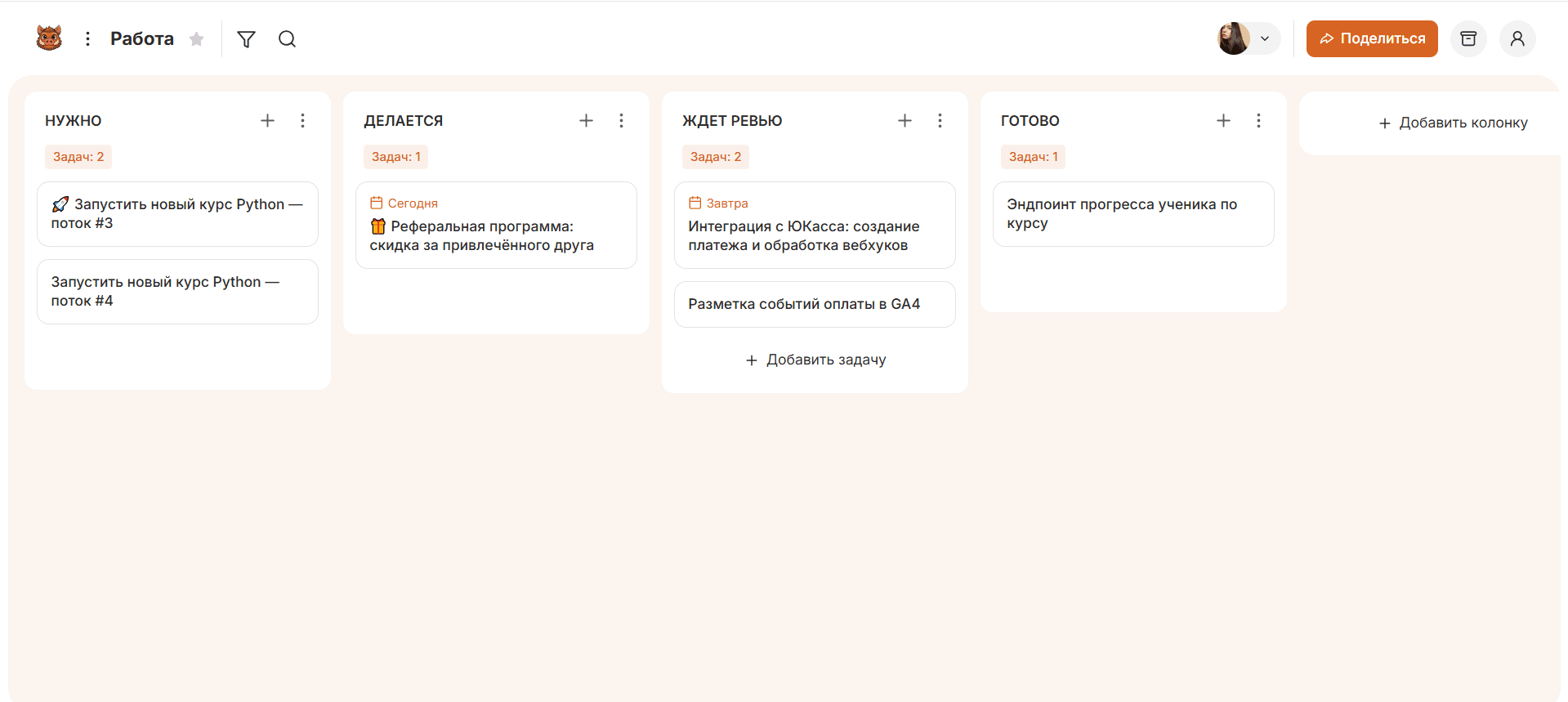
- Columns The stages through which the work goes. At least three: “It needs to be done”, “In work”, “Ready”. Under the real process, columns are usually more.
- Challenges - units of work. Each takes its place on the board and moves from column to column as it runs. One task is one unit of work.
- Movement from left to right The task moves to the next column when its stage is completed. The position of the task shows the status without a single word of report.
- Public access The board is seen by all participants, changes appear instantly for everyone. This makes the picture a working tool.
The approach in which tasks move in stages is called the Kanban method. Its principles, history and practices are discussed separately in the article about kanban.
Where did the kanban board come from?
Kanban board came from Toyota plants, where in the middle of the XX century, signs-signals were controlled by the supply of parts to the conveyor. The word "kanban" in Japanese means "visible tablet": the plate informed the site that it was time to submit the next batch - produced not according to plan, but on the fact of the request.
In the early 2000s, the approach was transferred to intellectual work. Parts of the parts were replaced by tasks, the conveyor - the stages of the process, and physical plates - first stickers on the wall, then tasks on the digital board. The online format added something the wall didn't have: remote access, movement history, and memory that doesn't erase when the sticker is repainted.
Therefore, a modern online whiteboard is not just a “board on the Internet”, but the result of two steps: from a factory signal to visual task management and from a wall in the office to a common digital space.
What properties does the task have?
A task has properties—fields that describe what needs to be done, who answers, and by what date. The set of properties determines whether it is possible to take the task into operation without additional questions.
The minimum requirement is four properties:
| Properties | Why? |
|---|---|
| Formulation of the result | It is clear what to consider done |
| Executive | You can see who's answering. |
| Term | I know when to wait. |
| Priority | It's clear what to take first |
The formulation of the result is the most important property and the most frequent place of failure. Landing is not a task, but a theme. “To collect the landing of shares on the ready-made layout and lay out on the test domain” is a task that is clear when it is closed.
Other properties are added according to need, not earlier: checklist of subtasks, attached files, label type of work (task, idea, editing), discussion within the task. It is not necessary to overload the task with fields from the very beginning - unfilled fields turn into noise.
How is an online board different from a physical one?
An online whiteboard differs from a physical one in that it is accessible remotely, does not lose data, and does things that stickers on the wall cannot. The physical board is more visible in one room, but loses in everything else.
| Parameter | Physical board | Online board |
|---|---|---|
| Access. | Just that wall. | From any device by reference |
| Remote team. | It's not working. | Everyone sees the same board. |
| History | Sticker regated - the past erased | You can see when and where the task was going. |
| Investments. | There's nowhere to attach the file. | Files, links, discussion at the task |
| Loss of data | The sticker unstuck and fell. | Data is stored automatically |
| Search | Eyes on the wall | Filter and search by task |
The physical board has one advantage - it is constantly in sight and does not require you to open the tab. Therefore, some teams keep both formats: an office wall for review and an online whiteboard as the main working tool.
How does a kanban board differ from a task list?
A Kanban board differs from a task list in that it shows not “what to do,” but “at what stage each task is.” The list answers the question “what”, the board answers the question “where is stuck”.
The difference is evident in practice. The list of twenty items does not show that five tasks are started and abandoned, three are waiting for someone else’s answer, and two are back for revision. They all look the same, just lines. On the board, the same twenty tasks are laid out in columns, and you can immediately see: the queue for verification is growing, and only two reached readiness in a week.
Short. The list shows the amount of work. The board shows the movement of the work. When there are few tasks and they are done in turn, a list is enough. When tasks flow through several stages and people, you need a board.
What views does the online board have?
An online whiteboard has multiple representations – ways to show the same tasks in different ways. The board answers the question “where is stuck,” but sometimes it’s more convenient to look at the same tasks as a list or calendar.
- Board (kanban) Problems in column-stages. Main view: shows status and bottlenecks.
- List - the same tasks in rows, convenient for quick input and mass editing.
- Calendar - tasks by dates, you can see loading by day and deadlines.
- Gantt diagram Time problems with dependencies, for projects with a tight schedule.
Simple services only provide a board – and that’s enough for streaming. Large platforms add a list, a calendar, and a gant, switching views over the same data: changed the task in one form – it changed in all.
How does task movement work?
The movement of tasks works on the principle of pulling: the task moves to the next stage not when it was transferred there, but when there was free space. The contractor takes a new task only after closing the current one.
The practical effect is that bottlenecks become visible on their own. If the tasks accumulate before the “Verification” column, and do not move further, then the test does not keep up with the development. On the to-do list it is not visible at all, on the board - noticeable at first glance.
To prevent tasks from starting faster than they are completed, the team agrees on the maximum of tasks in the active columns. How to arrange columns for your process, what to write in the properties of the task and how to read the board on the planks - in a practical guide How to Use a Kanban Board.
What does a working day with a board look like?
The working day with the board is built around the movement of tasks from left to right, and not around status meetings. Take a typical day of a small team by step.
- Morning: A brief view of the board. The team opens the board and passes it from right to left - from "Done" to new tasks. First, something close to completion, then stuck. It takes 10 minutes instead of half an hour.
- A breakdown of stuck tasks. A task that hasn't moved for days is a reason to ask why. Usually, the reason is not in the performer, but in anticipation of someone else’s answer or an unclear property of the task.
- Work during the day. After completing the task, the performer moves it to the next column and takes a new one - but only if there is a place in his column by agreement. The status changes at the time of transition, not retroactively.
- There was an urgent task. It is set separately and given priority. On the board you can immediately see where it is built into the flow, and you do not have to keep it in your head.
- Evening: the board is the report. Nobody writes "what I did." The position of tasks on the board already shows what is closed, what is in work and where the queue is. The manager sees the picture without asking questions.
Who needs an online kanban board?
Online kanban board is needed by everyone who has tasks that flow and get lost in correspondence. It is not tied to the industry, it is tied to the type of work.
- Remote and distributed teams A common board replaces an office wall that no one else has.
- Marketing and content – materials go through the stages of “idea → text → edits → publication”, the board shows where the queue is.
- Support Applications come unpredictably, the board separates “in work” from “waiting for a customer’s response”.
- Small development teams Task statuses are visible without status meetings.
- Personal planning Three columns and a limit of 2-3 tasks keep the focus on the current one.
Tasks come continuously and priorities change along the way. If the work is planned for months ahead on a rigid schedule with dependencies, the kanban boards are not enough - they need a Gantt chart and planning.
How does the board connect with other services?
An online whiteboard connects to other services through integrations and an open API, a software interface through which tasks can be created and moved automatically rather than by hand.
What this does in practice:
- Automatic task creation. An application from the site or letter turns into a task on the board without manual input.
- Communication to messenger. Notification of the task moving comes to the work chat.
- Connecting AI assistants. Through the API, assistants are connected to the board, who start tasks themselves, sort them by columns and tell you what is stuck.
For the team, this means that the board ceases to be a separate place where you need to manually deposit everything, and becomes part of the overall working circuit.
What mistakes prevent the board from working?
Four errors interfere with the board: someone else's set of speakers, tasks do not move in time, the properties of the task are not filled and no one looks at the board.
- A copied column set. Columns from someone else's process don't reflect yours - the board doesn't show where the tasks actually stand.
- Tasks move backwards. If the status changes once a week, the board shows yesterday and lies about the deadline.
- Empty properties of the task. Without the wording of the result and the deadline, the task becomes a reminder of “something to do” rather than a working unit.
- The board was turned on and forgotten. The board only works when the team looks at it every day. The abandoned board quickly diverges from reality and ceases to help.
How to start using an online board?
You can start using the online whiteboard in a minute: create a board, put columns under your process and make current tasks. You do not need to register a team and configure a project for the first run.
First launch order:
- Create a whiteboard and name columns by real stages of your work.
- Enter all current tasks, including those started and forgotten.
- Fill in the basic properties: result, performer, term.
- Set up tasks in columns where they are now.
- Give your colleagues a link - the board will open in the same form.
A quick start is fine. canbano: the board is created in a few seconds, access is given by a link, and the web version and applications for iOS and Android work on the same data. Through an open API, you can connect AI assistants and external services to the board. The free rate is enough to try the format on a live process.
Frequent questions about online kanban board
Is an online kanban board the same as a task manager?
Not exactly. A Kanban board is a way to show tasks in stages; a Task Manager is a program in which the board is often just one of the views along with a list, calendar, and Gantt chart. Simple services give only a board, large – a board inside the platform.
Do I need an online board for a team of two or three people?
If things get lost in correspondence, yes. For this size, a free board is enough: it keeps the statuses in plain sight and replaces the questions “did you do?”.
Can I use the kanban board alone?
Yeah. A personal board of three columns with a limit of 2-3 tasks on “In work” helps not to spray and bring the start to the end.
How is an online board more convenient than a board in the office?
Access and memory: it is visible remotely, changes appear in everyone at once, the history of transitions is saved, and files and discussion are attached to tasks. The office wall can't do that.
What properties of the task must be filled?
Four: formulation of the result, performer, deadline and priority. This is enough so that the task can be taken into operation without clarification. Other properties – checklist, attachments, labels – are added as needed.
How much does an online kanban board cost?
Basic boards are available for free – enough for personal tasks and small teams. Paid tariffs for services open extended functions and large teams, but they are not needed to start.