A long to-do list keeps commitments, but often doesn’t tell you what to do next. One list includes specific tasks, major projects, ideas, meetings, and records like “Marina” or “website” whose meaning has to be re-established before execution.
The working list is built on a cycle: Take a look at it, take a look at it.. The general list stores tasks that still need to be solved, and the daily sample contains only the volume that is placed in the available time. We will analyze this approach on six entries: “report”, “Marina”, “website”, “doctor”, “distribution idea” and “buy a lamp”.
What should keep a work list
The work list should store specific actions that the person is ready to start or for which the next step is already clear. Projects, notes and events require a separate solution first.
Let's take a look at six examples:
After analysis, the list becomes shorter not because part of the obligations disappeared. Each record gets to the right place and stops competing for attention with tasks that really require action.
What records are not tasks
A project, note, event, and expectation do not become work tasks until a specific action is identified.
Recording. "report" Denotes a result for which several steps are needed: collect data, check the indicators, prepare the text and send the document. In the working list is the next action. Collect weekly figures for the report.
Recording. "distribution idea" There is no obligation to do the work. The idea is kept in notes until a separate decision.
A visit to the doctor is time-bound. Until the appointment is scheduled, the action remains on the list. "To see a doctor.". The confirmed visit already belongs to the calendar.
How to collect everything in one place
Collect new assignments, thoughts, and commitments into one temporary container, and then transfer specific tasks to a permanent work system. There should be a single collection contour, not necessarily a single physical list for all cases.
An incoming container is a paper sheet, a note on your phone or a digital service that is always available. At the collection stage, the record does not require detailed registration. The main task is not to leave obligations distributed between memory, chats, letters and random notes.
After collection, each record is disassembled: execute, turn into a project, transfer to a calendar, save as a note, delegate, leave pending or delete.
This kind of order helps. streamlineIn which a new commitment first hits an understandable collection point and then gets its place.
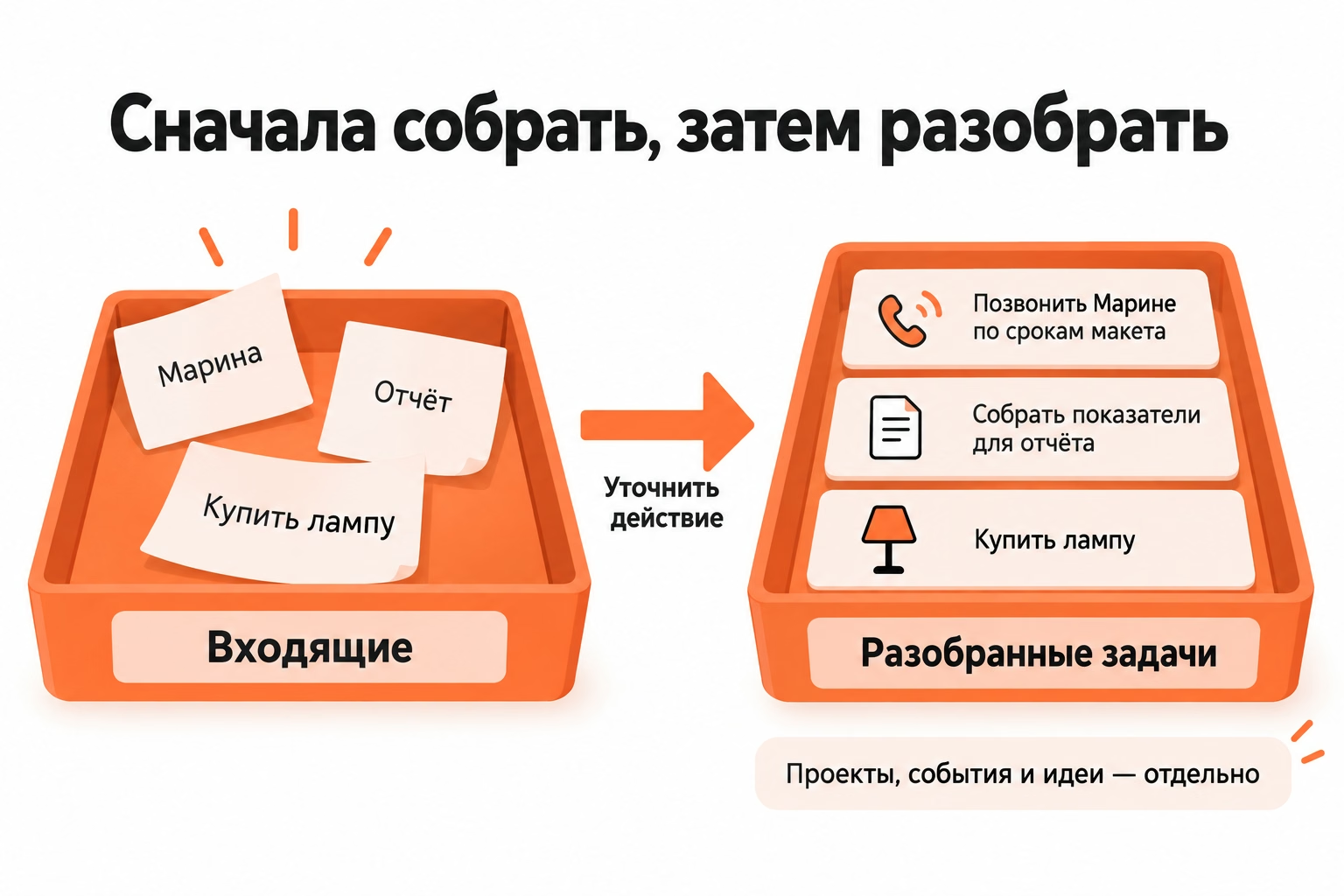
How to disassemble incoming records
Disassemble each incoming entry to a state in which the following solution is clear.
For our example, the result looks like this:
- "The Report." To highlight the project and the immediate action;
- "Marina" “Call Marina on the timing of the layout”;
- "Site" clarify the required result;
- "Doctor." transfer the appointed reception to the calendar;
- "The mailing idea" - keep in mind;
- "Buy a lamp" Leave it to a specific task.
The review does not determine the order of implementation. Its task is to turn obscure records into understandable objects, and priority will appear in the next stage.
How to formulate a task to perform
The task begins with an action and describes the result after which the item is closed. Context is added only when without it, before starting work, it is necessary to restore the meaning of the recording.
Let us compare the three formulations:
The verb helps you see the action: call, check out, collect, buy, send out. One verb is not enough if the result is unclear. "Working on the site" still doesn't explain what needs to change.
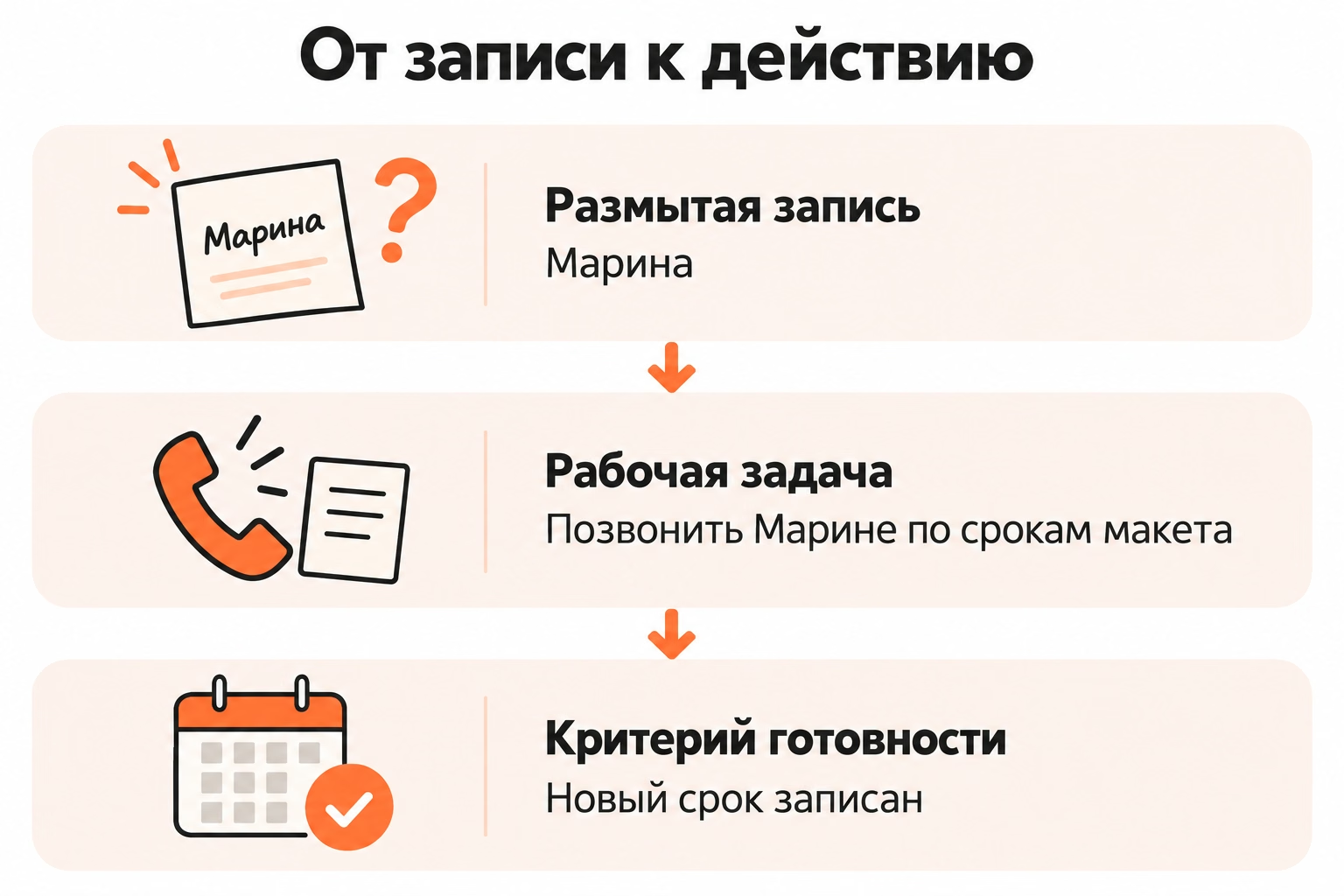
Where a specific action begins
A specific action begins where a person does not need to make another decision before starting.
Recording. "deal with the site" Makes you identify the problem first. Formulation Check why the application form is not sent from the course page It already sets the object of work.
The degree of detail depends on the task. Buying a lamp does not require a detailed description. Working with a document will require a link, a recipient, or other context, without which the start will again turn into a search for information.
What to consider the completion of the task
The task is completed when a predetermined result is obtained, not when the work is simply spent time.
To call Marina, the result will be an agreed and recorded deadline. To check the form - the established cause of the error. To buy a lamp - the desired model.
Repetitive work requires a more precise boundary. Then it's useful. testify Separate mandatory actions from optional revisions.
The clear result reduces the number of items that remain “almost ready” for weeks.
When to turn a task into a project
Turn a record into a project when the result requires several independent actions and is not completed in one working approach.
“Prepare a report” includes data collection, verification, writing and sending. The overall entry remains the benchmark of the project, and the next action falls into the working list. "Collect the indicators for the week".
Decomposition does not require the entire project to be written in advance until the last step. To start, it is enough to determine the result and the next action, after which the next stage will become clear.
How to Choose Things for the Next Day
Choose a daily set after checking the actual deadlines, commitments, available time and importance of tasks. A common list always contains more work than a person can accomplish in one day.
Suppose that after the analysis there are ten specific tasks. There is already a meeting and a doctor on the calendar, and there are four hours of free working time left. Moving all ten items to the daily list does not make them feasible.
From our example for the day fall:
- collect indicators for the report;
- Call Marina on the timing of the layout;
- Buy a lamp on the way home.
Check the form on the site remains in the general list if there is no real deadline for today.
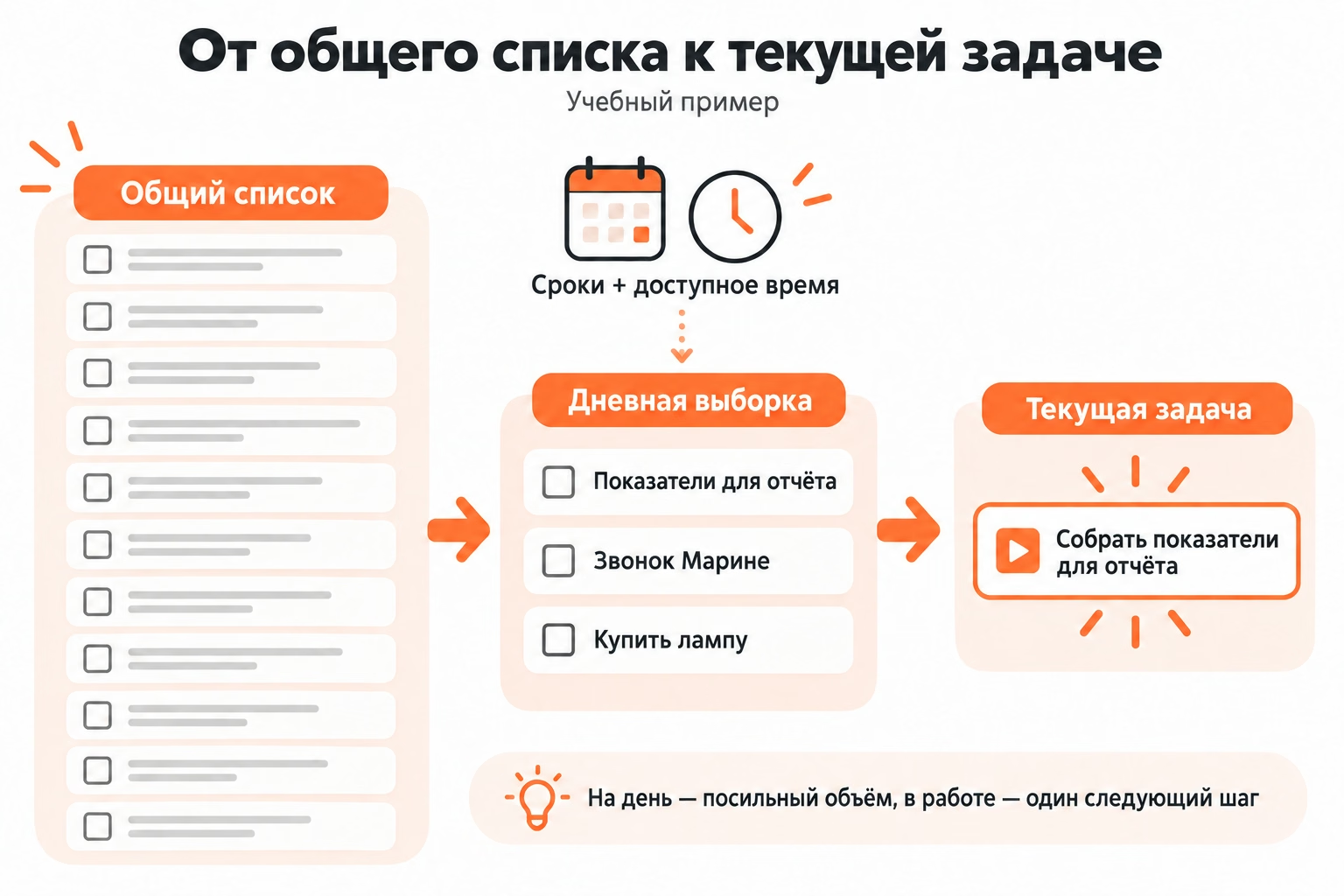
How to Choose Priority Based on Time
First, consider the mandatory deadlines, then the consequences of the postponement and the amount of time available.
The problem with a real deadline today gets an advantage over the case without a deadline. Between two non-urgent tasks rises the one whose delay blocks further work or another person.
After selection, useful plan outComparing tasks with meetings, commitments and reserve. The general list remains a separate level and does not turn into a schedule of the day.
How many tasks to leave today
The number of tasks depends on their size and available time, so there is no universal limit of three, five or seven.
Three tasks of ten minutes and three tasks of two hours create a completely different load. The indicator is the expected amount of work, not the number of lines.
The daily sample should remain short enough for the person to see the actual next step. The emergence of a new urgent task requires a revision of the plan, not the mechanical addition of another item.
What to do with a long list
A long list is first offloaded with solutions rather than trying to close random small cases faster. Overload occurs when tasks, projects, expectations, and outdated records lie nearby without clear order.
The working protocol consists of four actions:
- stop transferring the entire list to the daily list;
- Select one small executable task to start;
- Remove projects and expectations from the queue of ongoing actions;
- Remove records that no longer require results.
The task of this analysis is to restore the structure of the list, not to collect as many ticks as possible in a short time.
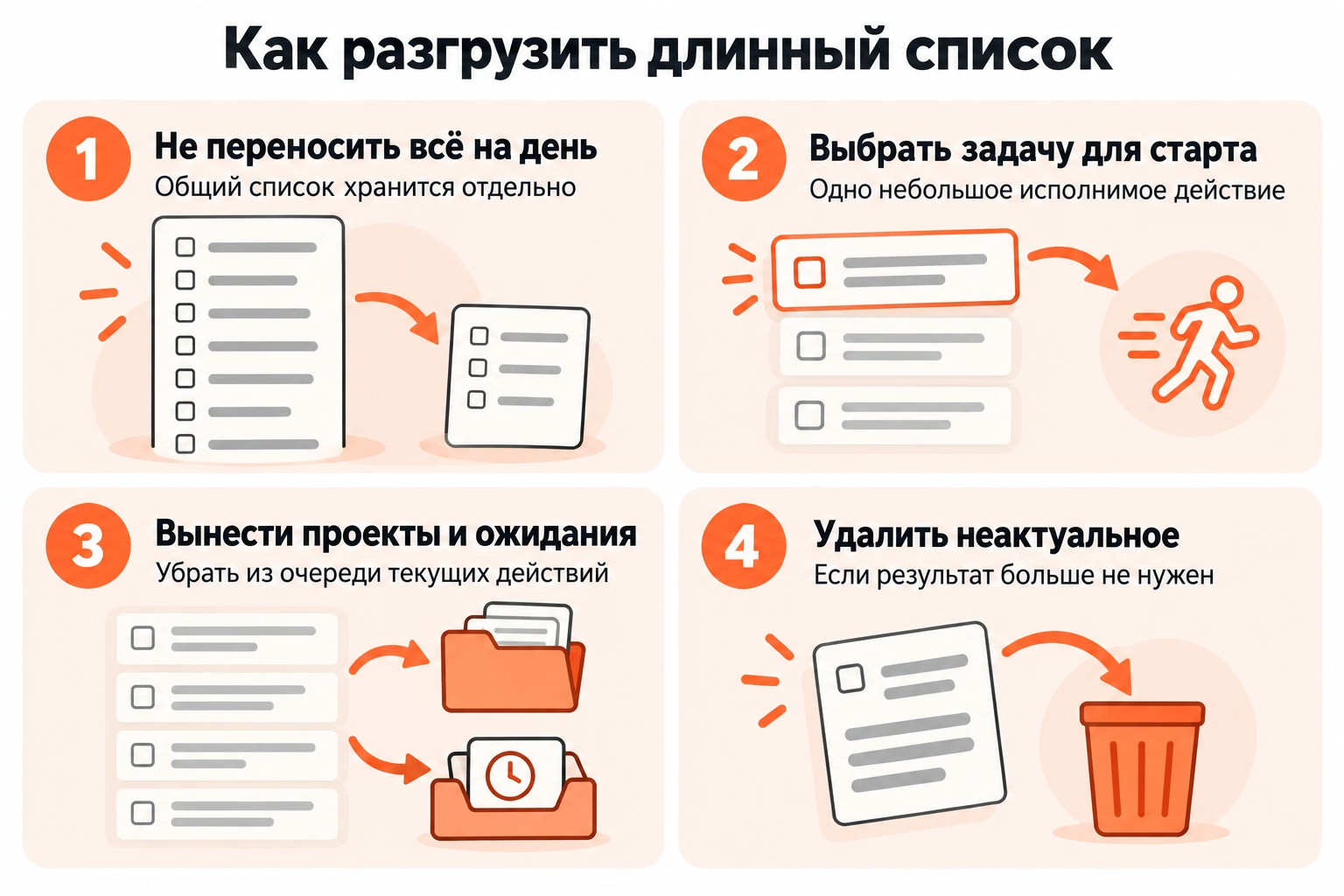
How to remove the overload before the start
Leave before your eyes only the current task and a short daily set.
The fifty-point general list continues to hold the commitment, but it does not need to be re-read before every call or letter.
Start with a specific action with a clear completion boundary. Once completed, go back to the daily sample and take the next item.
A short task should not supplant a larger one just because it is easier to close. The order is still determined by the timing, effects of the postponement and the time available.
What to do with suspended items
Each hung item receives one solution: to reformulate, postpone consciously, translate into waiting or delete.
Recording. "Marina", which is postponed for several weeks, requires clarification: who to call, why and what result is needed. Work with external dependence receives a condition of return - for example, Wait for the model from Marina until Thursday.
The personal list and the team backlog solve different tasks. Mixed workflow is useful personalize and a team queue so that personal reminders don't compete with tasks that multiple participants decide on.
Re-transfer without a new solution indicates that the recording has ceased to perform the function of the task.
How to Review the List Regularly
Regular review closes the completed, determines the fate of the unfinished and removes lost relevance records. Without such a clean-up, even a well-formulated list gradually becomes an archive of unresolved commitments.
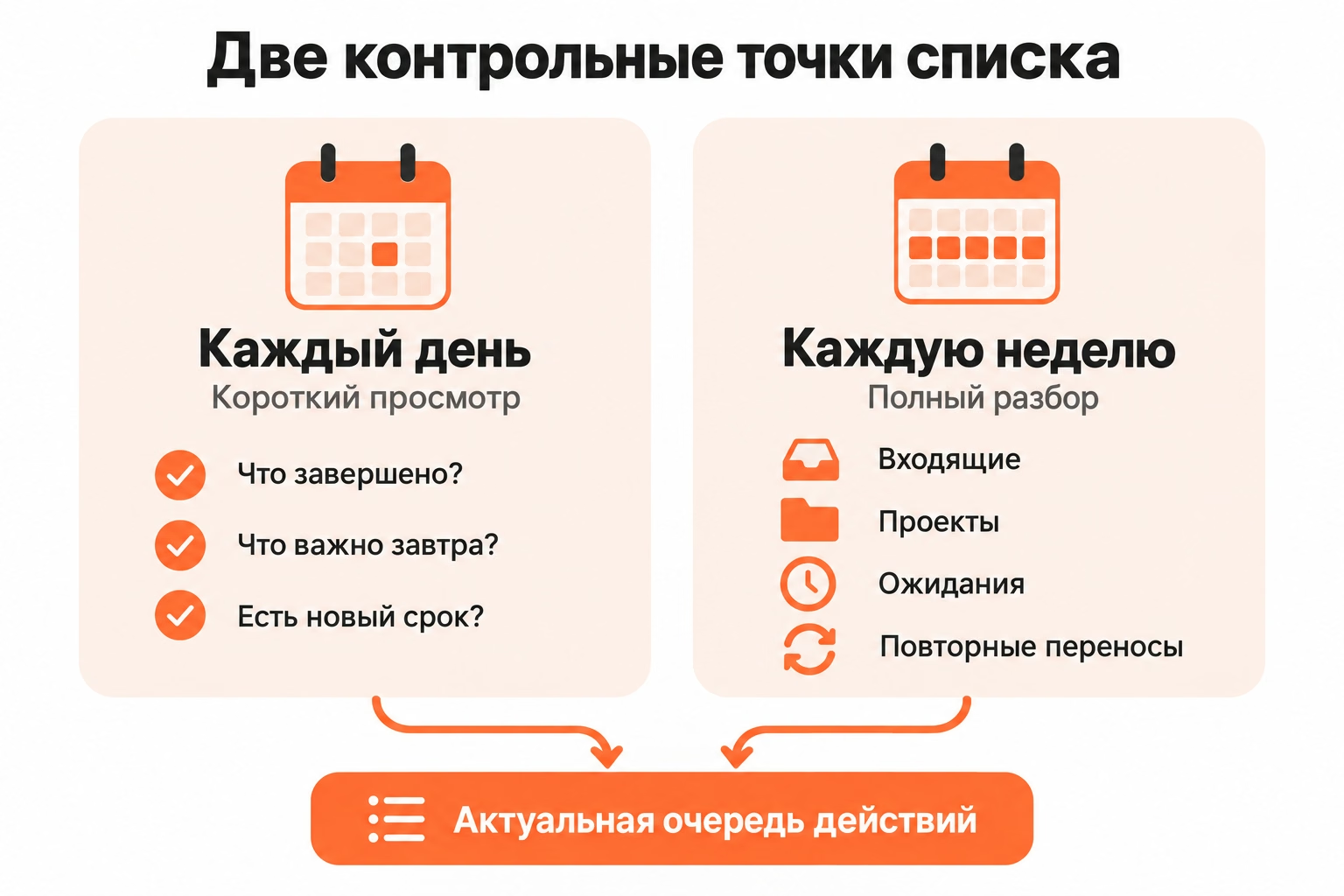
A short daily review answers three questions:
- what is completed;
- What really needs attention tomorrow
- Is there a new term or obligation?
A fuller weekly analysis covers incoming, projects, expectations and items that have been rescheduled several times.
When to endure the unfinished
Transfer an unfinished task only after a new decision about its relevance and place in the queue.
One transfer can be the usual consequence of a changed day. Repetitive transfer already requires a cause check.
The unfinished item has four options:
- the task remains relevant and gets a new place in the queue;
- The next step is poorly formulated and requires clarification.
- The work depends on an external event;
- The task is no longer necessary.
Mechanical copying of the item the next day hides the reason why the work does not move.
What to remove from the list
Delete records that no longer have a commitment, value, or expected outcome.
The old idea of mailing doesn’t have to lie next to current tasks for years. It is stored in the archive of ideas or removed if the need has disappeared.
The completed task is first closed after checking the result. History is stored only when it is necessary for practical purposes: for reporting, reworking, or restoring context.
Cleaning the list does not require you to complete everything accumulated. Some records should disappear after an informed decision.
When a list of things is not enough
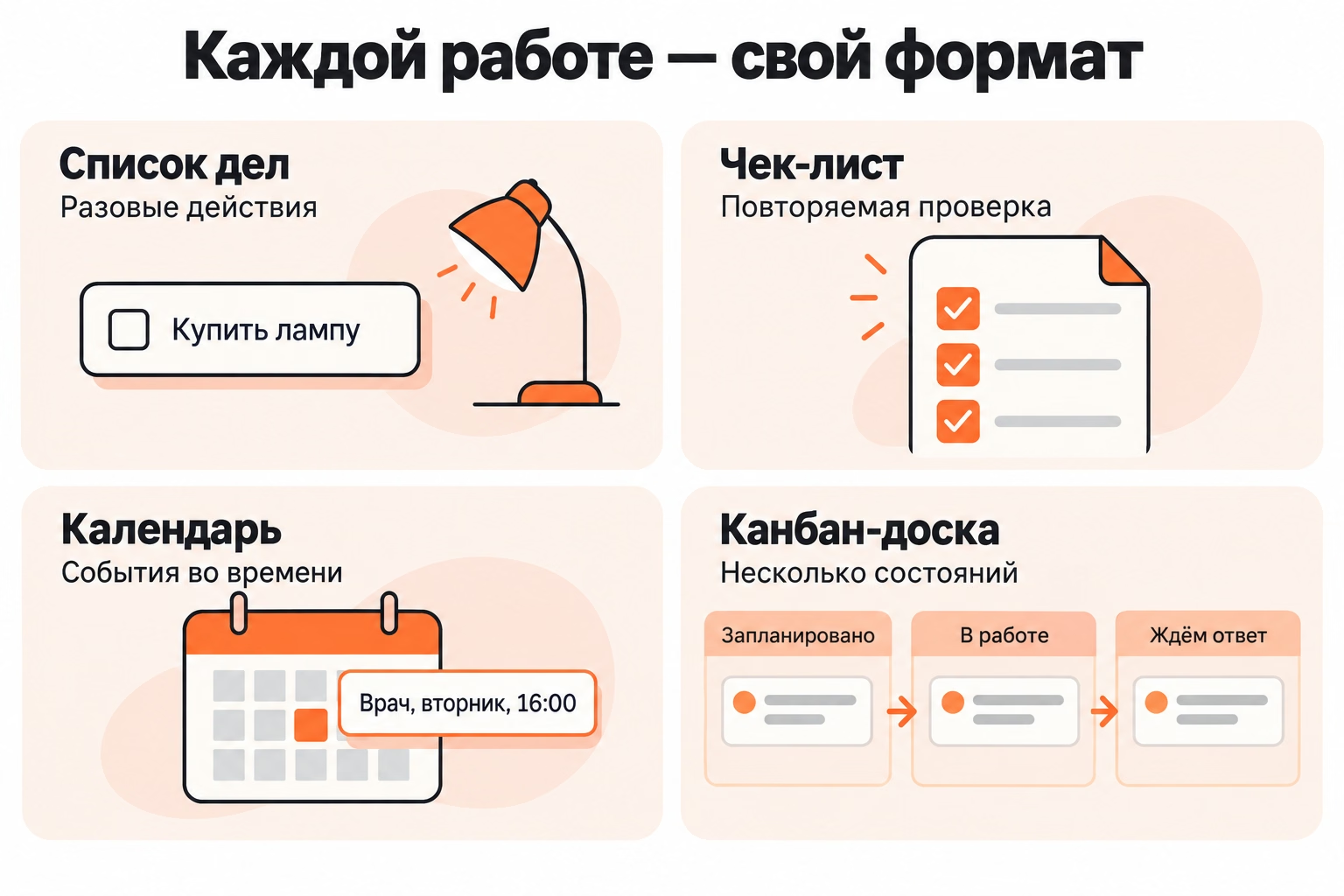
A list is not enough when a job requires repeated validation, timing, or tracking multiple significant states. The format is chosen by the nature of the work, and not at will to store everything in one place.
“Buying a lamp” remains on the list. A confirmed visit to the doctor refers to the calendar. Repeated verification of the report is stored in the checklist. Work on a site with stages “planned”, “in work” and “waiting for an answer” requires you to see the state of the task.
How to distinguish a checklist from a list
A list stores individual tasks, and a checklist stores repeatable verification steps within a single process.
"Send a weekly report" - task.
“Check the period → check the result → check the attachment → specify the recipient” A checklist within a repeatable task.
Mixing formats inflates the overall list of technical actions and hides the real results.
When you need a calendar
A calendar is needed for actions that are associated with a specific date or time.
Recording. "doctor" first becomes a task "To see a doctor.". After the appointment event "Doctor, Tuesday, 16:00." It takes place on the calendar.
Preparatory actions remain in the usual list: to collect documents or obtain survey results.
The duration of the task and the event in time are not equal. Deadline sets the last boundary of the result, and the calendar record takes a specific place in the schedule.
When to Move Work to Kanban Board
Transfer work to the kanban board when the “made/not done” feature is no longer enough and the task passes through several significant states.
Work on the site after clarification becomes a task Correct the submission of the application form on the course page. Then there are stages: the task is planned, executed, waits for a response and after verification is closed.
For such a process, the training scheme looks like this:
Incoming → Today → In work → Ready.
In the presence of external dependencies, a waiting state is added. Column names are given under a real process, so an example is not a mandatory configuration.
In Kanbano, the user manually creates and names columns and then moves the cards between states. The card stores the description, performer, date, marks, status, checklist and attachments.
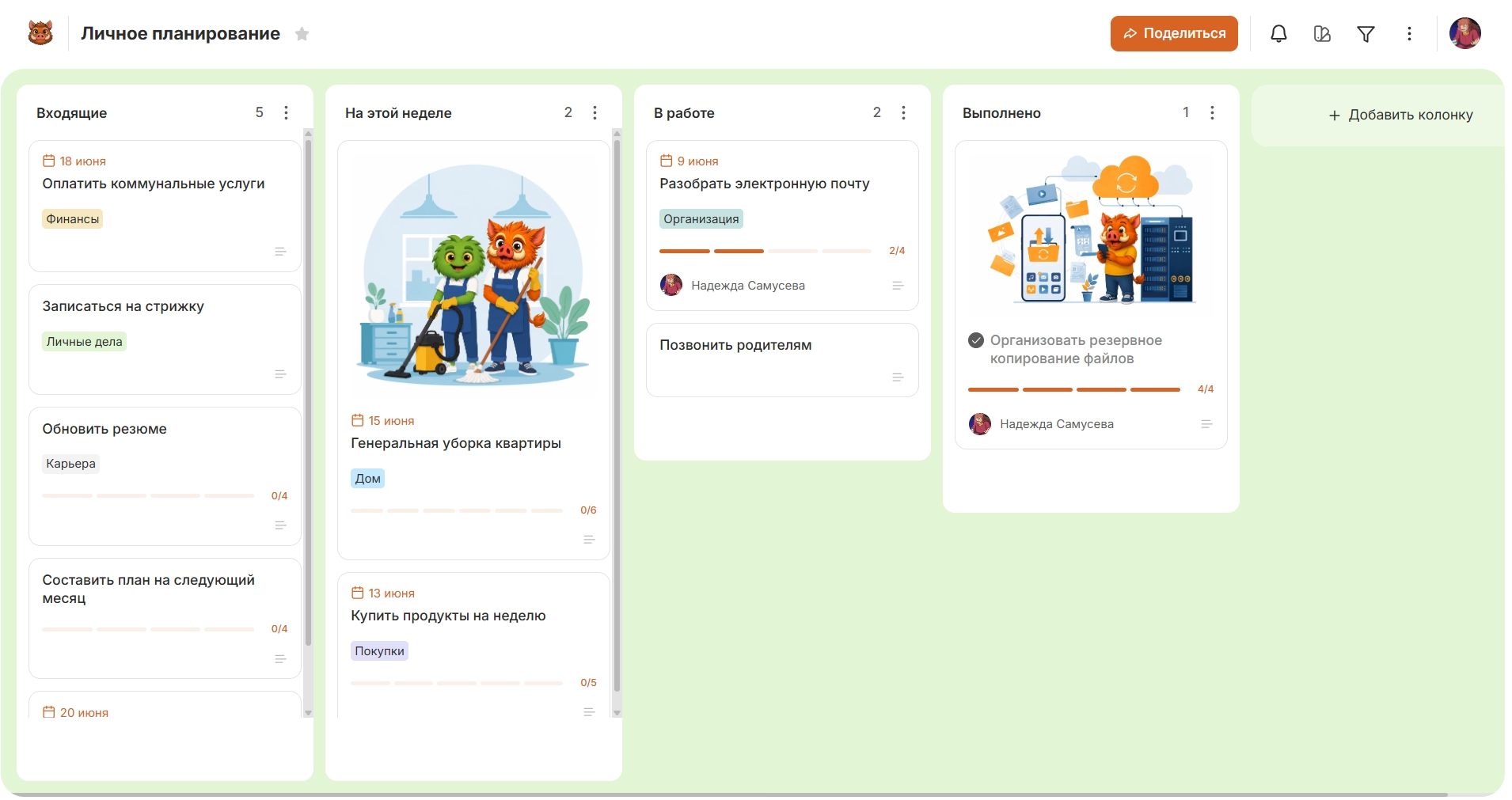
You do not need to transfer all household affairs, ideas and events to the board. The first to get there are tasks for which the list ceased to show the real state of work. Some of these tasks already make sense. listboard and check if the selected structure helps to see the current stage.