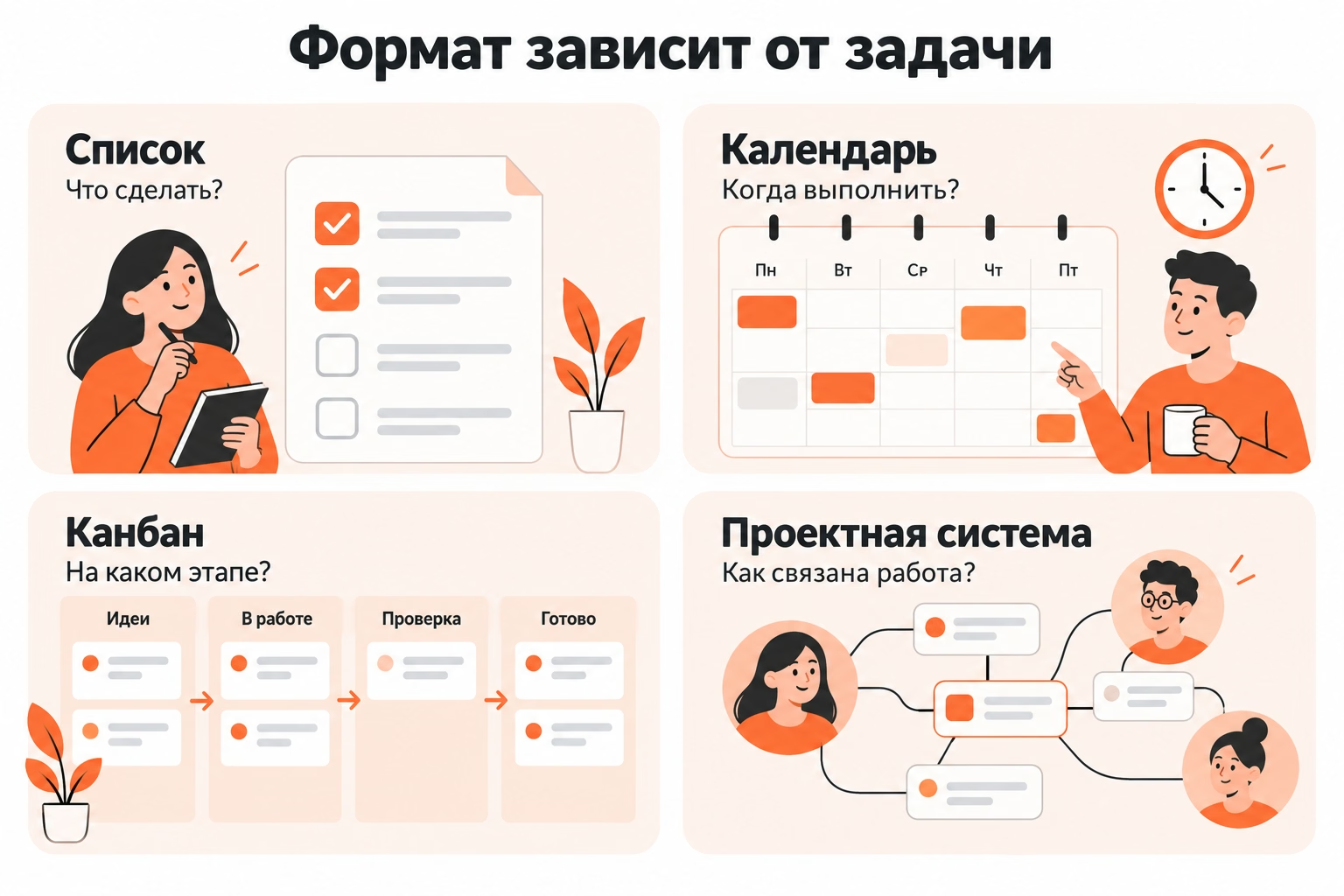
The task planner is chosen by how the person receives, organizes and performs the work. The list stores the queue of cases, the calendar distributes them by time, the kanban board shows the movement by stages, and the design system connects several processes and participants.
Let's look at the choice in one scenario. A person conducts work, educational and household affairs, receives tasks from mail, chats and notes, monitors deadlines, and conducts part of the work through several states. To check, take 12 real-world tasks and compare two suitable services during the working week. The number of tasks refers only to the educational example.
How a planner differs from a to-do list
The scheduler stores not only the to-do list, but also the context, timing, state, or relationship of the task to the workflow. The specific structure depends on the class of service and the scenario.
A single product combines several views, but having a list, calendar or whiteboard does not determine the suitability of the service. Check for actions that are repeated in normal work.
When a simple list is enough
A simple list is enough when most tasks are independent and only go through two states: “not done” and “done”.
This scenario includes:
- Pay the bill;
- buy a textbook;
- send the document;
- sign up for a class;
- order supplies.
For a short stream, a complex board adds service without new information. The case is enough to write down, if necessary, set a deadline and close after execution.
The list ceases to reflect the process when the task passes through intermediate states. The document is first prepared, then sent for approval, returned for revision and only after adoption is closed. The "done/not done" mark doesn't show where the work is now.
When you need a kanban board
A kanban board is needed when tasks change state before completion, and the current position of work affects the next actions.
For example:
Planned → In work → Testing → Ready.
The card moves along with the actual change of state. You can see on the board what hasn't started yet, what's being done and what the outcome is waiting to be checked.
Before you pick a board, the challenge is personalize And the actual state of work. Only then does it become clear which columns a particular process needs.
Kanban is not required just for visual cards. A two-column “Do” and “Done” board often solves the same problem as a regular list.
When you need a calendar
A calendar is needed when most of the work is tied to a specific day or time.
This scenario includes:
- meetings;
- classes;
- calls;
- problems with a hard time;
- Work blocks pre-distributed by clock.
The completion period and the work time remain different parameters. The report must be sent on Friday, and preparation takes Tuesday morning and Thursday afternoon.
The calendar script helps. schedule Time and see the actual loading. The transfer of one task should not require manual correction of several identical records.
What tasks should be closed service
The service must support a repeatable task path from appearance to completion. Requirements define the user, the sources of incoming, the role of terms and the state of work.
In the educational scenario, a person conducts three types of cases:
- work tasks from mail and chat;
- training tasks from notes and schedules;
- household matters that appear during the week.
Part of the task ends with one action. Others have a hard deadline, go through multiple stages, or require a checklist and file.
A brief description of the process already sets the requirements:
one person → three sources of incoming → part of cases with deadlines → several tasks go through stages → individual tasks need checklists and attachments.
Who will use the planner?
First, determine if one person or several participants are working with the system. The joint scenario adds requirements for access, performers, discussions and overall state of work.
A personal planner doesn’t need complex roles if everything is handled by one person. The team already needs to see who is in charge of the task, who has access to context, and where changes are being recorded.
Family tasks occupy an intermediate position. Shared purchases or travel arrangements require shared access, but a complete design system for such a flow often creates unnecessary maintenance.
Where new challenges arise
Record the real sources of business and see how quickly the new task gets from each source to the work system.
In our example, the tasks appear:
- by e-mail;
- in work chat rooms;
- In notes on the phone.
The lengthy creation of each record increases the likelihood that a person will delay the transfer. Part of the cases will remain in letters and messages, and the general queue will no longer show the entire amount of work.
While checking, create a regular task from each source, add the necessary context, and return to the recording after a few days. The operating system should avoid re-searching the original message.
How often do deadlines change?
Check not only the date, but also the behavior of the system after the deadline change.
In a stable process, the date is set once and the task is closed on a set day. In mobile work, the meeting is postponed, the external response is delayed, and the unfinished task moves to another date.
Once the deadline is changed, the task should retain a single relevant context. Constantly manually correcting one record in multiple locations shows that the structure chosen does not fit the process well.
What functions to check before choosing
A mandatory function is considered, without which the real task requires a constant workaround. It is better to derive service requirements from your own process, rather than from a long catalog of features.
For the training scenario, the test looks like this:
Separately check localization, payment, tariff restrictions, data storage, joint access, import and export. These conditions change, so specific parameters are checked immediately before selection.
How the task card is arranged
The card should store the context that is required to perform a particular job.
For our script, check:
- name;
- description;
- term;
- condition;
- tags;
- the contractor in joint work;
- checklist;
- investments.
A checklist stores steps within a single task, not independent results. Hard work is helpful at first step outSo that the card does not turn into a long description without verifiable actions.
Excess fields also create a load. A short case should not require a long filling of the card before starting work.
What types of representations are needed
Choose ideas about issues that arise during work.
The list responds: What's left to do.
The calendar says: when the work is scheduled.
Kanban replies: At what stage is the task.
The project system connects work with a larger structure, participants, and dependencies.
A single process does not require a complete set of representations. The absence of a calendar does not interfere with a person who manages tasks by state and almost does not distribute work by hour. The situation is reversed for the class schedule.
How to check the work on the right devices
Check the key scenario on the devices you use during a typical week.
On a working computer, a person often parses a large number of tasks. The phone is needed to quickly add the case, view the deadline or change the status. When working without a stable Internet separately check the behavior of the system when the connection is lost.
Having a mobile app is not enough. Create a task on one device, open it on another, change the data, and make sure the context is preserved.
Platform, synchronization and offline mode become selection criteria only if there is an appropriate working scenario.
How to compare two suitable options
The two services are compared on the same set of real-world tasks. Manufacturer demo cards show the interface, but do not reflect the behavior of the system in your process.
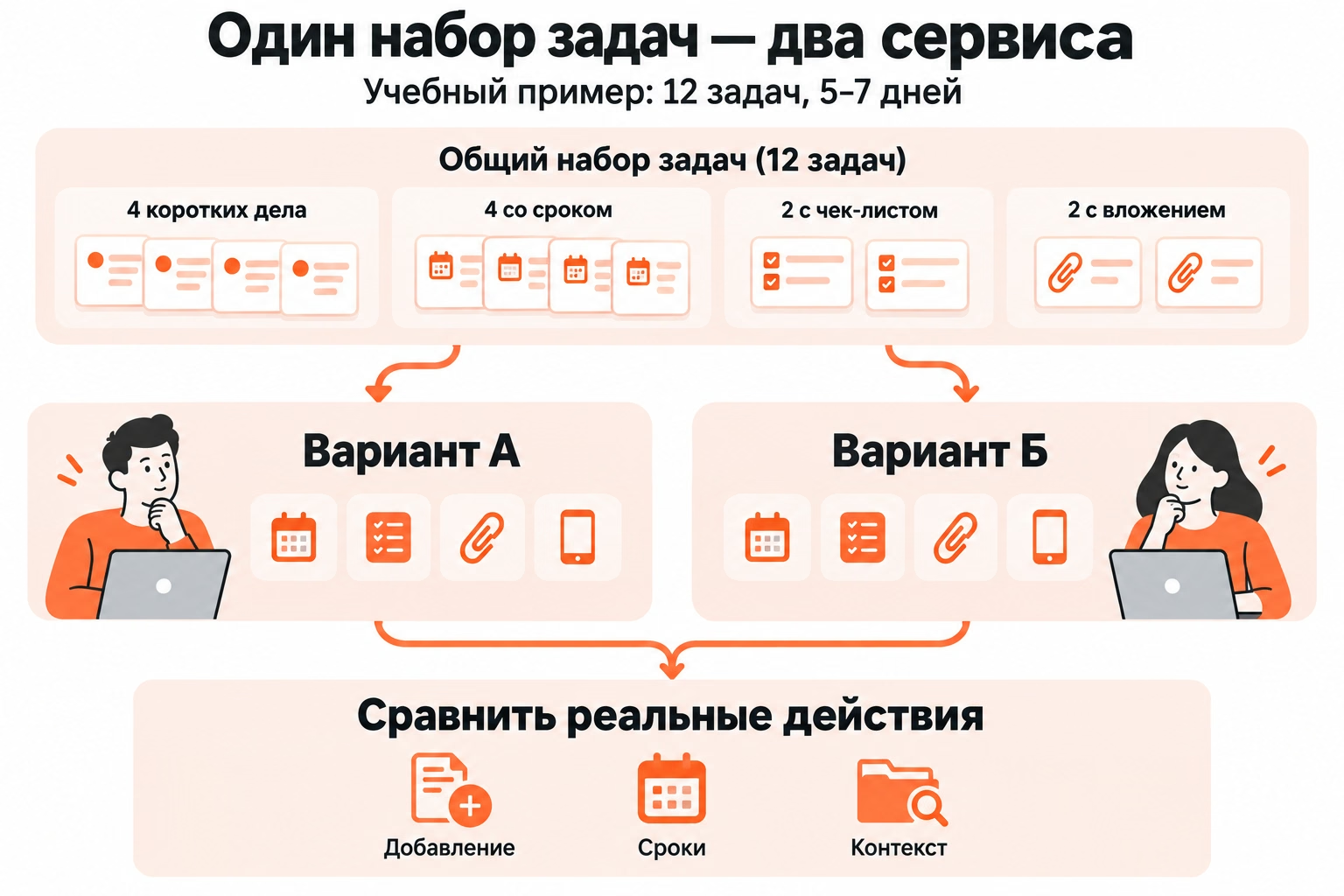
After the initial selection, leave two options. For the training test we use 12 tasks:
- four brief cases;
- four tasks with a deadline;
- Two checklist tasks;
- Two attachment tasks.
The pilot for 5-7 days serves as a guide for this example, not a universal selection period.
How to conduct a pilot on real tasks
Transfer the same set to both services and do the same thing.
In each variant:
- Add incoming ones.
- Set deadlines;
- Change the state of two tasks;
- Fill out two checklists;
- Attach two files;
- Create a new task from your phone.
- Move the deadline.
- Find the right job in a few days.
Estimate not the number of cards created, but the costs and failures of the workflow.
What signs indicate suitability
A suitable service closes the mandatory actions without constant duplication of information and does not require the support of the second system only to compensate for its limitations.
Problems can be seen during the pilot:
- tasks remain in chat rooms;
- The deadline must be recorded in two places.
- the current status is restored from memory;
- Important files are stored separately without a clear connection to the task.
- The mobile scenario does not cover the necessary actions.
- Regular surgery requires a long workaround process.
The number of additional features does not compensate for the failure of the baseline scenario. The benefits of automation are lost if a person regularly forgets to transfer incoming tasks or does not understand the state of current tasks.
When a Kanban Planner Approaches
The Kanban Scheduler is suitable for processes in which tasks go through several states before completion, and the current stage influences further actions.
For example:
Incoming → Scheduled → Work → Check → Ready.
The titles serve only as a teaching example. In a particular process, waiting for materials, approval, publication or other stages appear. Columns should reflect the actual movement of work.
After choosing the Kanban approach Compare kanban services according to already formed requirements: card structure, work with deadlines, joint access and tariff restrictions.
How to check compliance with stages
Write down the real states of several tasks and match them to the structure of the board.
For example:
- household business: planned → ready;
- working document: planned → in work → inspection → ready;
- task with an external answer: planned → in work → waiting → ready.
A separate column is justified when the transition changes the understanding of the state of the task. “Important” is not a stage of work – it is better to store such a sign in a label.
The Kanban scenario loses its meaning when the cards do not move between states and the stages do not affect decisions. For such a stream, a regular list requires less maintenance.
What Canbano Limits to Consider
Kanbano supports customizable columns and cards with description, performer, date, labels, status, checklist and attachments. Filters work by artist, creator, status, date and tags; cards and boards are archived with restoration; the service is available in the web version, on Android and iOS.
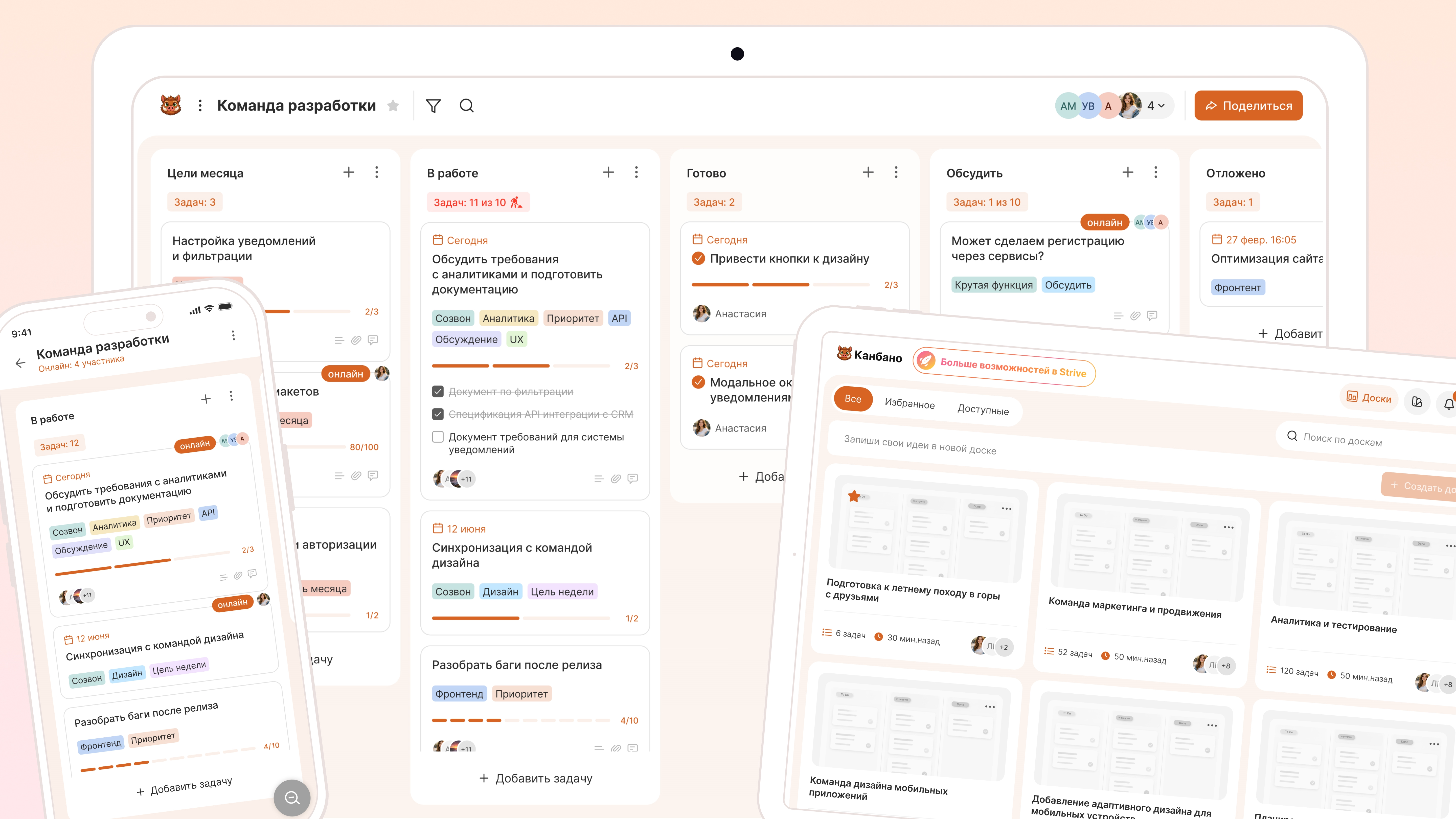
Calendar representation, built-in reminders, automatic repeats, time tracker, Gantt chart, automatic prioritization and task reports are not included in the confirmed feature set.
Before the complete transfer of the system, the task is check out on several working cards: to run them through real states, open from the right devices and assess the volume of manual actions.
A strong process dependence on a calendar schedule or complex design relationships indicates a different tool class or an additional system for that part of the work.
How to make a decision after the pilot
Choose a service if mandatory tasks pass through it without constant duplication, the state of operation remains clear, and the method of data transfer is known in advance.
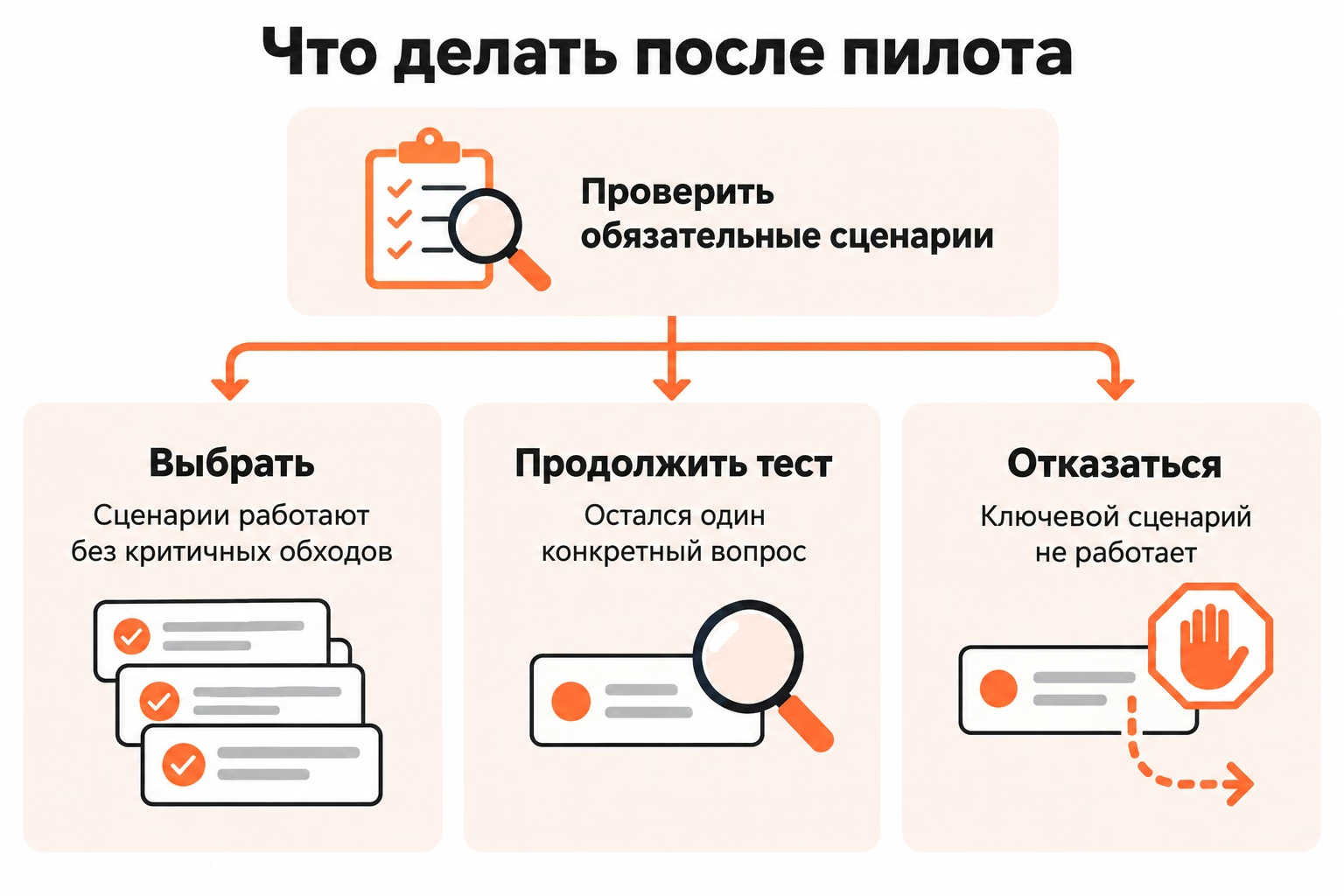
After the pilot, there are three solutions:
- choose Mandatory scenarios work without critical workarounds;
- follow up - one specific issue requires additional verification;
- refuse The key scenario does not work or creates permanent additional actions.
The first impression of the interface does not replace the working test. A few days show how the system behaves after the accumulation of inputs, the postponement of deadlines and the appearance of unfinished work.
When to abandon the service
Refuse the service if a critical scenario requires a constant workaround process that is repeated every week.
Grounds for refusal:
- tasks are difficult to transfer from a real source;
- The mobile scenario does not cover the necessary actions.
- The state of work must be kept separately;
- The tariff limit affects the normal scope of tasks;
- important data are not transferred in an acceptable manner;
- An investment or history is lost by mandatory actions.
A rare, uncomfortable feature doesn't make the whole tool unsuitable. The decision must be based on actions that are repeated in a real process.
How to Move the Work System
Move the structure and active tasks first, then add the story you really need in the future.
Before the migration, record:
- current categories or projects;
- active tasks;
- deadlines;
- working conditions;
- important descriptions and attachments;
- Completed data that needs to be saved.
Imports and exports are checked until final selection, especially with a large archive. Manual transfer of ten current tasks and migration of several years of history require different amounts of work.
The first week after the transfer is used as a recheck: whether all new tasks fall into the system, whether the deadlines remain, whether the chosen structure is sufficient, and whether the workarounds detected during the pilot have disappeared.
After this test, the next step is try out the selected format On current tasks and only then transfer the rest of the working system.