A team task backlog is a modifiable ordered queue of work that the team is considering to perform but has not yet begun. The card in the backlog fixes the task for further solution, not the obligation to fulfill it.
Backlog collects requests from chats, letters, meetings, support and other sources, separates raw incoming from prepared tasks and sets the order of the next choice. Old records should not prevent the team from seeing the top of the queue.
The term “backlog” is used in different working contexts:
We are talking about the common queue of a small team. A cross-cutting example is the work on the website of an online school, where tasks come from support, messages from the head and a weekly call.
How to Build Backlog of Team Tasks
Bring the incoming ones to one place, remove explicit repetitions, clarify the minimum context and appoint the person who is responsible for analyzing the queue. The collection ends with the primary processing of records, and not the transfer of all correspondence to the board.
The online school team receives several incoming ones:
- “The price is not clear on the course page”;
- “Adjust prices on the website”;
- "The program file is not opened";
- Make a new calculator;
- “Update Teacher Photos”;
- “Integration with a closed service.”
Each record requires a separate solution. Two price reports are first checked for a match. For the calculator, the task of the user is specified. Integration confirms whether the need remains.
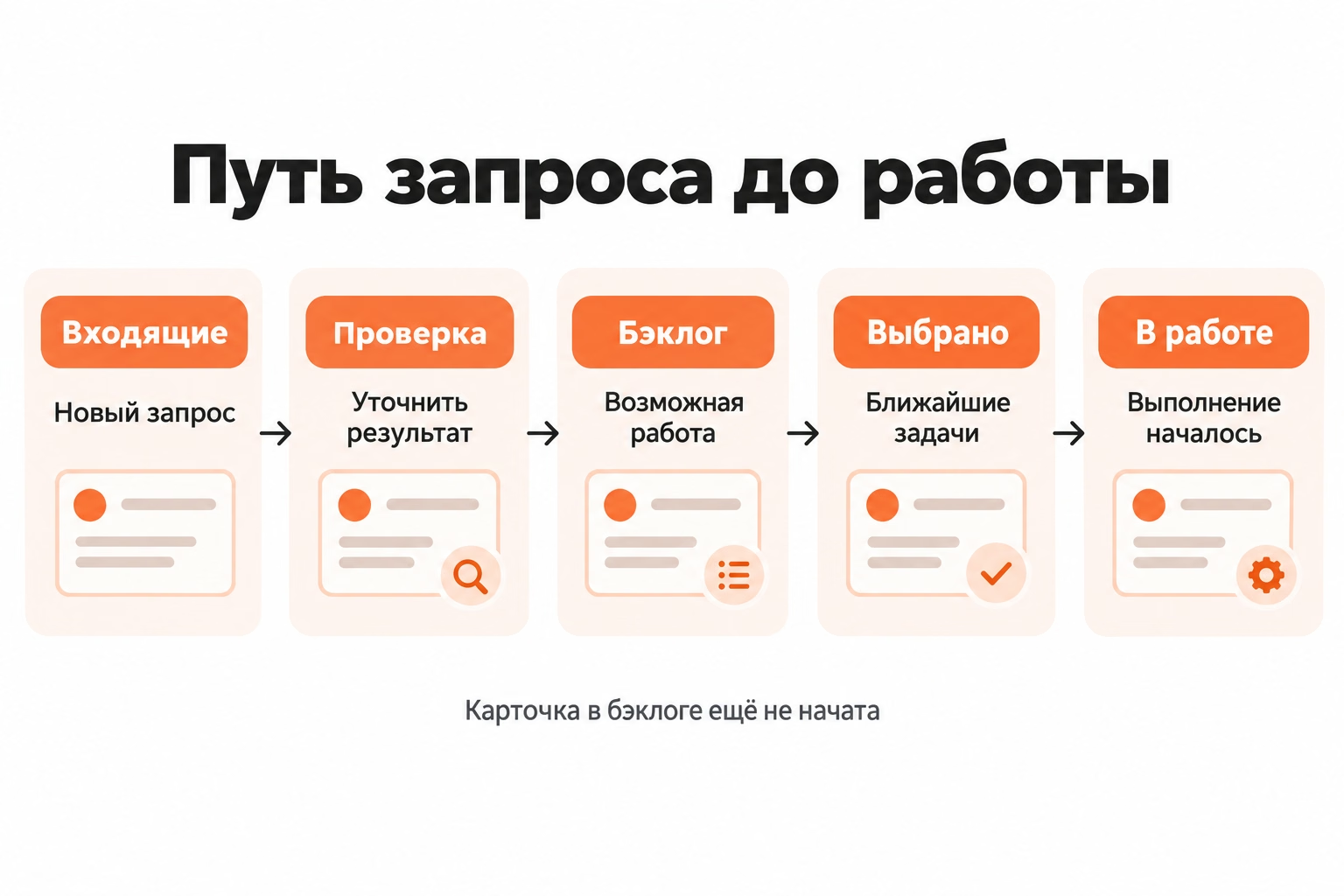
The workflow looks like this:
Incoming → check → backlog → choice → active work.
Raw requests are not mixed with prepared cards. The team first finds out what happened and what result is required, and then decides whether to leave the work in the common queue.
What tasks to put in a common backlog
Put commitments, defects, improvements, research, and validated ideas on which the team must make a decision or perform the work.
The raw wish remains in the incoming until the source and expected result are understood. Recording. Make a new calculator. It does not explain what task the user will solve, what data he uses and what the result should be.
Defect "The program file is not opened" It requires further clarification as to which page the file is located on, whether the error is being reproduced, who it affects, and what should happen after the correction.
Personal tasks of employees are not included in the team backlog. Individual cases are conducted in a separate stream to separate The work that the team decides on.
What to write in the queue card
Write in the card the information necessary to understand the problem and the next solution. The cards at the top of the queue require more context than ideas the team doesn't plan to get to yet.
For the working card is fixed:
- name with action and expected result;
- source of the request;
- a brief explanation;
- responsible for clarification;
- term or external condition if available;
- type-of-work label;
- A known addiction.
After clarification, the record "Adjust prices on the site" turn into Show on the page of each course the cost and terms of payment from a confirmed source. The wording defines the verifiable result and the boundaries of the work.
Two similar price messages are combined only after checking pages, sources, and expected results. One query may refer to an incomprehensible supply of value, the other to an actual error in numbers.
The top cards are additionally checked for readiness to choose: the result is clear, the main materials are found, critical dependencies are named, the volume allows you to discuss the implementation. Distant ideas are not filled with fields that lose relevance before the task itself.
How to separate incoming from finished tasks
Separate raw incoming and prepared backlog. The incoming entry still requires a solution, and the card in the backlog is already recognized as a possible work with a clear result and sufficient context.
To move to the backlog, the team checks four conditions:
- the result is formulated;
- The main context is found;
- Critical dependence is named;
- The scope of the problem is clear for further solution.
Moving between columns alone does not check the quality of the card. The decision is made by the person who handles the queue.
The Selected column serves the following function: it stores a small set of prepared tasks, which the team plans to move to in the near future. Such a card has already been selected, but its implementation has not yet begun.
Who is responsible for the general queue
Assign a single process owner who monitors the regularity of parsing, the quality of the top cards and the basis of decisions. Team members engage in task clarification when they have the right context.
The queue owner is appointed by the team leader, coordinator or other participant with appropriate responsibility. The role of Product Owner (product owner) is not required by a regular team just because of the backlog.
New requests come from different people: support, developers, manager, customers or related departments. The owner of the queue is not obliged to know the answers to all questions, but makes sure that the card gets the solution.
The frequency of analysis depends on the speed of new tasks. Daily flow requires more frequent processing than multiple requests in a week.
How to arrange tasks in a working order
Arrange the cards by communication with the current goal, expected benefit, urgency, effort, risks and dependencies. The top of the queue should show what prepared work the team will consider sooner and why.
For three online school cards, the order is as follows:
The type of task itself does not give priority. Any defect does not become the first because of the "error" label, and a short edit does not go up just because of the small volume.
After ordering, the team selects immediate tasks from the top of the backlog, taking into account the available load. The whole backlog does not turn into a plan for the day.
RICE, ICE and MoSCoW are formalized prioritization options. Such approaches make sense with appropriate data and a sustainable assessment process. A small queue often lacks a single set of criteria and a fixed basis for decisions.
How to consider value, urgency, effort
First formulate the expected result, then compare the urgency, the amount of effort and the consequences of the delay. Evaluation determines the relative order of tasks rather than promising an accurate result in advance.
Value is associated with a specific change. For a defect with the course program, the result is: the user opens the desired file again. For the price card, the visitor sees the current cost and payment terms.
Urgentness occurs at a real time or the consequences of a delay. Wordings like “urgent” and “supervisor asks to see” without additional context do not automatically give priority.
The effort reflects the preliminary workload. New data changes the assessment: a small edit of the text after checking can be a change in several pages and data sources.
Risk is taken into account separately when an error affects payment, access to materials, obligations to the customer or other sensitive area of the process.
What to do with dependent tasks
Record the external dependence before transferring the card to active work and specify the condition after which the task will be ready for execution.
Card. "Update Teacher Photos" It depends on the original images. The description records who will transfer the materials, which pages require replacement and by what time the files are expected.
Before receiving materials, the task remains outside of active work. The contractor does not spend working time on a card that cannot be brought to the result.
The receipt of files changes the conditions, so the queue owner re-evaluates the card and its position relative to other tasks.
How to clean a crowded backlog
Review the queue through decisions, not through the age of the cards. The team checks the relevance of the need, finds duplicates, clarifies the missing context and removes work that has lost touch with current obligations.
The clarification of the backlog is called refinement or grooming. For a small team, it is important to regularly analyze the queue itself, rather than conducting a separate ritual on a fixed schedule.
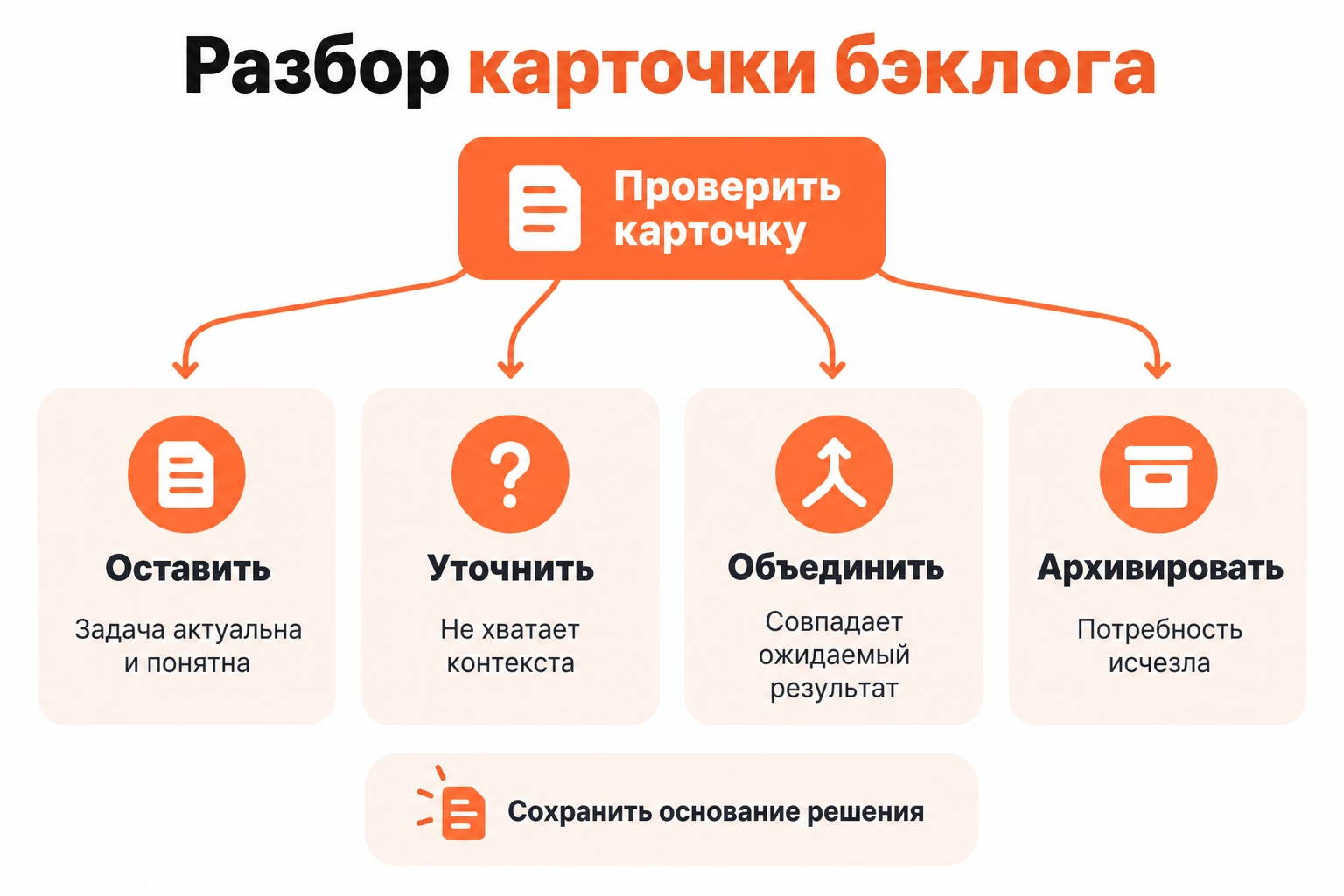
Each questionable card is carried out through four decisions:
- leave;
- clarify;
- combine with a double;
- archive with cause.
The age of the card is a reason to check its relevance, but not a reason to delete it. An old defect, a commitment to a customer, or an external deadline task stays in line as long as the need persists.
A crowded backlog creates a problem at the time of selection: the top of the queue is lost among records that have not been decided for a long time.
What tasks to combine or archive
Combine cards only for the same expected result, keeping sources and important clarifications. Archive tasks after confirming that the need has disappeared or the job is no longer relevant to current obligations.
Two price messages are combined if they relate to one page, one problem, and one result. In the final card, both sources are saved so as not to lose the context of the problem.
Card. “Integration with a closed service” He goes to the archive after confirming that the agreement is no longer valid and the need has disappeared. Together with the decision, the date, basis and condition of return are recorded.
The reason for the decision is also needed by other team members. Without it, an archived card in a month again raises the same question: the problem lost relevance or was closed indiscriminately.
How to Transfer Tasks into Active Work
Transfer into active work a small prepared volume, taking into account the available team power and dependencies. Readiness means that the card is clear, not that its execution has already begun.
In the streaming process, the team takes the next prepared card after free power appears. This principle holds the boundary between future queue and current work.
Agreement on how workflowIt determines the transition between states: the new incoming first undergoes analysis, and does not displace the prepared work just because of the time of appearance.
The entire backlog is not moved to the active part of the board. The queue stores future choices, the working columns are tasks that have already begun.
How backlog is different from active column
Backlog stores possible work, and the active column shows the tasks already started. WIP, Work in Progress, refers to the current execution, not the entire queue.
For example, a backlog contains twenty prepared cards, and the team is working on three simultaneously. The number of active tasks reflects the current load, but does not limit the size of the entire queue to the same value.
When setting up the process, you need to plank: the queue is responsible for the future choice, and working states show the movement of tasks already begun.
The name "Backlog" does not become a mandatory column. The team uses names that correspond to the actual states of its work.
How to set up a backlog board
Restore the real stages of the process, then set individual states for incoming, prepared queue, immediate selection and active work. The schema is used to explain the boundaries between these states, not to copy without change.
For the online school team, take the sequence:
Incoming → Backlog → Selected → Work → Ready.
Each column answers a specific question:
- Incoming - the record has already been received, but still requires analysis;
- Backlog The team recognized the card as a possible job.
- Selected - the task is included in the nearest set;
- At work. - implementation has already begun;
- Ready. - the expected result has been obtained.
Names need to be checked against the actual team process. Copying a foreign structure creates unnecessary statuses if the actual movement of tasks is arranged differently.
What columns to create for a common queue
Create only those columns between which the card passes under an understandable condition. The column shows the state of work, the label is its type.
A small incoming stream does not always require a separate incoming column. Responsible immediately disassembles the new record and either translates it into a backlog, or rejects after checking.
The “Selected” column also depends on the process. The team removes it if the next task is always taken directly from the top of the prepared backlog.
In Kanbano, the team sets the number and names of the columns, and the card stores the description, date, marks, status, checklist and attachments. Filters work by artist, creator, status, date and labels, and the archive saves the removed cards with subsequent restoration.

When choosing a tool, the team Looking at Canbano's possibilities through its own process: whether the card has enough context, whether the columns reflect real states, and whether the queue remains clear with the current volume of tasks.
How to check the queue in a week
Check the completeness of the incoming, the quality of the upper part of the backlog and the basis of the decisions made. After the first period, change one element of the process that prevented you from sorting out or selecting tasks.
The weekly review answers six questions:
- Whether all work commitments have reached a common point of collection;
- Whether the cards are left without a clear result;
- Are there any duplicates?
- whether the order of the upper tasks is clear;
- Whether the reasons for the archive remain;
- Whether there are records without the next decision.
In the example, the defect with the file is prepared and raised in the queue, the price card is specified, the photos are waiting for the source materials, and the idea of the calculator remains in the incoming until an understandable result appears.
The first view shows a specific problem in the process. The team selects one change: for example, fixes the source of each new request or assigns a regular analysis of incoming days with a large flow.
The next period shows whether the status of the queue has changed since this agreement. It is sufficient for the first cycle. command-lineAdd a few real incomings and set the date of the first analysis.