Personal kanban helps to keep everything before your eyes, understand what to do now, and not accumulate too many started tasks. On the board you can see the general queue, the current work, things in wait and what is already completed.
We will show you how to assemble such a board, select columns, formulate cards and determine the number of tasks in the work. Separately, we will analyze how to review the board, return to it after a break, work with stuck cases and transfer the system from paper to online.
How to build a personal kanban board in one evening
Collect current affairs in one place, divide the board into several working states and transfer to active work only those cards that you really intend to deal with now.
Personal kanban, or personal kanban, is a way to visually organize your own work. Jim Benson and Tonyanne DeMaria Barry formulated the approach in their 2011 book Personal Kanban: Mapping Work | Navigating Life. The authors identify two basic rules: visualize the work and limit the number of cases that have already begun, but not yet completed.
A personal kanban differs from a team kanban in that one person fills the queue, determines priority, selects the permissible number of active cards, and decides when work moves to the next stage.
For the first version of the board, four actions are enough:
- write out actual cases;
- create several working columns;
- select the immediate tasks;
- limit the number of cards at work.
There is no need to design the system in detail in advance. A few days of use will show which states are missing and which columns are not involved in the actual work.
What to write on cards in the first place
First, write out commitments that already require attention: unfinished business, promises to others, deadline tasks, and actions that you have to regularly return to mentally.
In the first unloading should include:
- time-bound cases;
- tasks already begun;
- obligations to others;
- household matters that cannot be forgotten;
- actions on current projects;
- Personal tasks that are really planned to be done.
The starting list becomes a backlog – a line of work that has not yet begun. It is not necessary to sort the cards by priority during the first unloading: first it is more useful to collect tasks in one place and see the total volume.
After unloading, remove duplicates and clarify too general wording.
Ideas without a decision on execution are best stored separately. A large "someday" list enlarges the board, but does not help you choose your next job and over time complicates the revision of the backlog.
What columns to put on the board
Start with five columns: “Do → Selected → Work → Wait → Ready”. Each column shows the status of the card, not the topic or sphere of life.
The “Selected” column can be removed with a short backlog and transfer the cards immediately from “Make” to “In Work”. “Waiting” is especially useful for documents, orders, freelance projects and other cases where the continuation depends on an external event.
The titles "Home", "Work" and "Study" are worse for columns. They describe the category but do not show movement. The task type is better indicated by a shortcut or color, maintaining a single workflow.
An additional step is needed only when it changes the user’s decision. A queue for verification or a separate wait shows the real state of the case, and intermediate statuses without their own function only complicate the maintenance of the board. The detailed principle of movement of tasks helps disassemble.
How to formulate a card so that the case does not hang
Formulate the card as a specific action with a clear result, and store the deadline, explanations and small steps inside it.
A good card answers at least three questions:
- What needs to be done;
- What is the result to be considered completion;
- Whether there is a term or condition of continuation.
The name “Prepare documents for a visa” is more accurate than “Visa”. The phrase “Write to Marina and request help” is even better when the other person’s response determines the next step.
Large cards often stand still because of too much volume. “Make repairs in the bathroom” includes the selection of materials, the search for a master, the purchase and acceptance of work. Each independent action with a separate result is better put in your card.
A checklist is suitable for small steps within a single case. The "Submit documents for a passport" card may contain:
- take a photo;
- verify the data;
- pay the fee;
- upload the documents.
A separate card is needed when a step has its own deadline, requires noticeable time, or is able to move independently of the rest of the task.
How many things to do at the same time
To start, keep one to three tasks in operation and change the limit after observing your own load. There is no universal number for personal kanban.
WIP, Work in Progress (unfinished work) Businesses that have already begun but are not yet completed. WIP limit It limits the number of such cards and does not allow you to indefinitely transfer new tasks to the active column.
Recommendations vary in number. Personal Kanban materials contain limits to one, two or three active tasks. One value does not need to be turned into a universal rule: the appropriate limit depends on the nature of the work.
The limit does not apply to the entire board:
- There can be dozens of cards in the “Make”;
- c "Selected" - several immediate tasks;
- (c) "At work" - only a limited number;
- The new card starts to be executed after the seat is vacated.
The restriction is not necessary for the sake of a neat view of the board. A large number of unfinished business forces you to constantly switch, remember the context and re-determine the next step.
How to choose your number of tasks at work
Start with two active cards and after a week, reduce or increase the limit on one task depending on how much work is actually moving to completion.
You can be guided by the behavior of the active column.
The nature of the case also affects the number. One big intellectual task and one short household activity create a different load than two jobs, each requiring several hours of concentration.
It is better not to change the limit after every difficult day. A weekly period is usually enough to see how many cards are completed, how many are idle and how much active work can be maintained without tail accumulation.
How to lead on the same board personal and work
Separate personal and work cards by shortcuts or color, but keep a common "In Work" column if both types of cases compete for the same time.
A single board shows the actual load. Working deadline, visit to the doctor and submission of documents belong to different areas, but take the time of one person.
On the general board, categories can be designated, for example:
- Work. - one label;
- Personal. - the other;
- Studying - third;
- Urgent. - a separate label if necessary.
The label answers the question of what the task is. The column answers another question - in what condition it is. It is not necessary to mix these signs in one structure.
Different boards are useful in really different processes. Freelance orders can move in the stages of “Request → Evaluation → Work → Consent → Payment”, and ordinary personal affairs are quite a short scheme.
The number of boards depends on the differences between processes, not on the number of spheres of life. If the structure of the movement is the same, it makes sense to leave one flow at first.
If the system is only created, it can be separately free-board for personal purposes.
What to do with things that are stuck
Determine the reason for the stop and change the card depending on it: transfer to the waiting, break up a large case, clarify the next step or remove a task that has lost relevance.
Stuck cards are better to disassemble not by age, but because of the stop.
For example, the task of “Entry to see a doctor” may stand motionless until the clinic opens the record. “Make a portfolio” hangs for another reason: the wording includes a big result, but does not show where to start.
The card, which is noticeably longer than the others, remains in the “In Work”, requires a solution. It is not necessary to keep it indefinitely among active tasks: this state hides the real available load.
Why do you need a waiting column on a personal board?
The “Waiting” column frees the active limit from tasks that a person is physically unable to advance.
There are cases that are missing:
- a response from a customer or other person;
- delivery;
- certificate or document;
- opening the record;
- the occurrence of a specific date;
- Other external actions.
In the card, it is useful to write down the condition of returning to the flow. For example, “wait until Thursday” or “check October 1.”
Waiting is different from the usual “after” transfer. The card has a specific external condition, after which the next step will appear.
The “waiting” column also needs to be revised. Without regular inspection, it gradually turns into an additional backlog with tasks that no one makes a decision about.
How often to review a personal board
View the active part of the board daily, and the full backlog, waiting and completed cards - about once a week.
Different levels of revision solve different tasks.
Daily viewing takes a few minutes. You need to understand what is already in the works and whether there is an opportunity to take the next card, rather than re-plan the entire board.
During the weekly review:
- Add new obligations to the backlog;
- Remove lost relevance tasks;
- Explain too general cards;
- Check the waiting column;
- Choose a few things for the next few days.
- See if the work is full;
- Clear the completed cards if necessary.
The specific day of the week is secondary. The board retains value as long as it reflects the actual state of affairs. The problems begin when new commitments live in chats and notes, and an outdated version of the work remains on the board.
What to do with the "Ready" column
Leave completed cards in Ready until the next revision, and then archive them when a long history begins to interfere with the current flow.
A completed case column is not just for storage. It shows the actual result and allows you to quickly see how much work has gone through the board in a week or a month.
"Ready" has two functions:
- Separate completed from active work;
- Keep a short history of recent results.
Store on the main board all completed tasks for the year is not required. With a large flow, the column is convenient to clean once a week, with a small one - once a month.
Old cards can be transferred to the archive, keeping the working board compact. Other options of the structure can be viewed if necessary. board up.
How to get back to the board you left behind
Remove the outdated, collect new obligations and restart the board with one or two active cards. It is not necessary to fully understand the old story before returning.
The return procedure looks like this:
- View the "In Work" column.
- Transfer the completed to "Ready."
- Send the blocked tasks to “Waiting”.
- Remove or archive irrelevant cards.
- Quickly review the old backlog.
- Add new commitments.
- Select one or two tasks and start moving again.
Abandoned board usually contains a mixture of already completed tasks, lost meaning of intentions and several actual tasks. Detailed processing of each old card only increases the threshold of return.
You don’t have to restructure your columns, come up with a new priority system, and move your entire archive. First, the board should start reflecting the current work again.
If the system is thrown back, check for several reasons:
- New tasks do not fall into one place;
- There are too many cards in the work;
- The tasks are too large;
- The board requires too much manual maintenance.
- There is no regular review.
Correcting one particular failure is more useful than another complete overhaul of the system.
Who doesn't have a personal kanban?
Personal kanban is not suitable for someone who primarily needs a detailed calendar plan, a complex system of dependencies between jobs or detailed timekeeping.
Kanban shows the queue and status of tasks. An appointment at 15:00, a train at 18:20, or a doctor’s appointment requires a different type of monitoring – a time-bound and, if necessary, a reminder.
The personal kanban works well with the calendar. The board is responsible for the queue and state of tasks, and the calendar is responsible for events and work intervals tied to a specific time.
When a paperboard works better than an online board
A paper board works better than an online board, when a person conducts business in one place, there are few cards and the entire workflow is useful to constantly see before your eyes.
Stickers on a wall or sheet do not require an application. The physical movement of the card makes the change in state noticeable, and the limited area does not allow the active column to expand indefinitely.
The paper format is also suitable for the first acquaintance with personal kanban. Instead of configuring the service, a person immediately checks the mechanics: what columns are needed, how many cards are placed in “In Work” and where tasks most often stop.
The online format becomes more useful when:
- tasks appear on the road;
- References and materials are needed to the cards;
- Backlog gets big;
- Completed cases must be preserved;
- The board is used from a computer and phone.
The carrier does not change the two rules of personal kanban: the work must remain visible, and the number of cases simultaneously started is limited. Before switching to digital format is useful strip.
How to transfer a personal board from paper to online
Create the usual working columns in the online whiteboard and first transfer active, waiting and immediate tasks. Add the old backlog only after checking the relevance.
The transfer is convenient to do in this order:
- Create the usual columns.
- Transfer the cards from "In Work."
- Add tasks from Waiting.
- Move the immediate plan.
- Check out the old backlog.
- Add only relevant cases.
- All new tasks are recorded online.
Changing the carrier does not require changing the operating rules at the same time. The usual sequence of states reduces the number of new actions: the place of storage of cards changes, but not the principle of movement.
In Kanbano, you can create a board with your own columns, and inside the cards store the description, date, labels, status, checklist and attachments. Timing, small steps and the necessary materials remain close to the task.
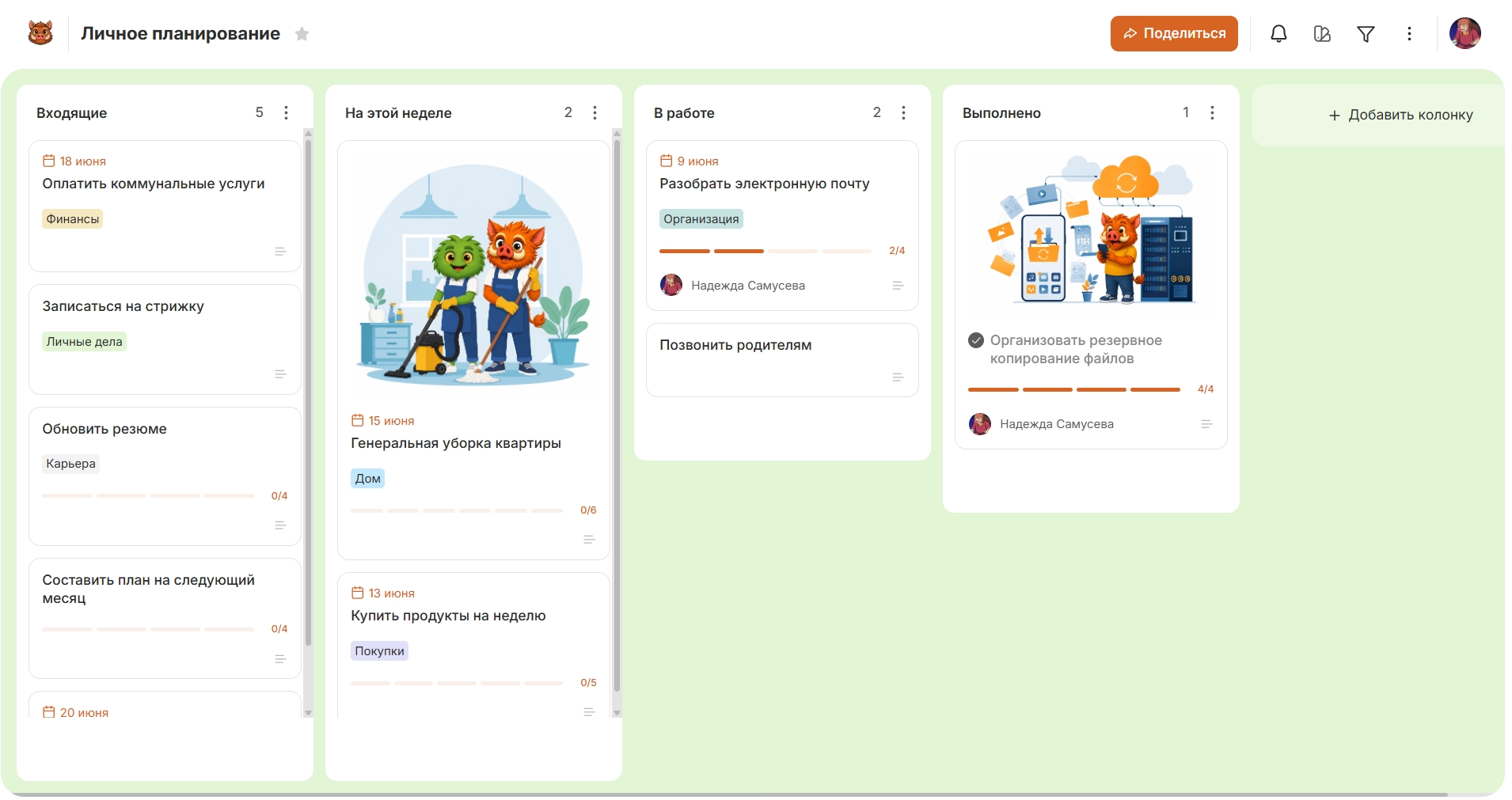
The archive allows you to remove completed or temporarily irrelevant cards from the workspace and restore them if necessary. The online board works in the web version and mobile applications for Android and iOS.
What to move first and what to leave
First of all, transfer active, waiting and upcoming cards, and leave old ideas and completed cases on paper until a separate revision.
For an active card, transfer only the working context: the deadline, the next step, the link, the checklist or the material without which the execution will stop.
The old backlog requires a separate check. A card that lies motionless for several months and has no deadline, result or next action first requires a decision about the need.
A paper board can be left for a few days as insurance, but new tasks after the transition should be recorded only online. The parallel maintenance of two current lists quickly creates different versions of the same system.
How to keep a board on hand on your phone
Fix new obligations from the phone immediately after they appear, and leave a detailed sorting and complete revision for the moment when it is convenient to look at the entire board.
The mobile scenario is better divided into two actions:
- immediately Create a card or change its status;
- later - add a description, term, label, checklist or materials.
After a call or on the road, it is more useful to immediately write down “send a contract” or “sign up for the TO” than to hope to remember the task in the evening.
Canbano runs on Android and iOS, so one board remains accessible from a computer and smartphone. The card can be created, opened or moved from the phone, and details can be added later.
After going online, keep the same mechanics that worked on paper: a shared backlog, a small short-term plan, a limited “In Work” column, a separate wait and regular cleaning of completed cards.
It is better to start a digital personal kanban with a few real cases, rather than transferring the whole story. Enough. free-boardAdd active cards and check the selected structure during the first week.