The Kanban board and Gantt diagram are used for different work management tasks: the first helps to control the flow and current state of tasks, the second helps to plan the timing, sequence and dependencies within the project.
In the article, we compare the device of the kanban board and Gantt diagrams, analyze the key terms and differences, determine what processes each tool is suitable for, when it makes sense to use them together and in what cases the kanban board is enough to work.
How a Kanban board differs from a Gantt chart
The Kanban board shows the state and movement of the work, and the Gantt diagram shows its position in time and dependence on other tasks.
The presence of deadlines does not require a Gantt diagram. On the kanban board, cards can also have deadlines. Gantt becomes necessary when the timing of tasks form a connected system: the delay of one work affects the beginning or end of another.
What the Kanban board shows and what the Gantt diagram shows
The Kanban board shows how tasks go through the stages of work, and the Gantt diagram shows how they are arranged in time and related to each other.
How the kanban board works
The Kanban board shows the movement of tasks in the stages of the process: the card represents a separate work, and the column represents its current state.
For example:
Request → In work → Verification → Ready
They are used to control the flow WIP limit (limit of unfinished work) Limit the number of tasks that are simultaneously at a certain stage. A new card goes further only if there is a free working capacity - this principle is called pull system (pull system).
Kanban also helps to distinguish between individual blockages and problems throughout the process. Blocker (blocking obstacle) delays a specific task, and bottleneck (bottleneck) limits the bandwidth of the stage and leads to the accumulation of queues.
The flow status is assessed by lead time (time of passage) how long the task moves between the selected points of the process, and throughput (completion speeds) How many tasks the team completes in a given period.
How the Gantt diagram works
Gantt's diagram shows the project on a timeline. Each task takes a period of time on it: the start date, the end date and the duration are indicated for it. Due to this, you can see what work is going on sequentially, what is being done in parallel and whether the project fits into the overall deadline.
For example:
Design → Design → Testing → Publication
Tasks can be linked to dependencies. The most common option is Finish-to-Start (End → Beginning)The next work begins only after the previous one is completed. Such a link is needed so that the transfer of one stage is reflected in subsequent terms.
Used for important events milestone. The milestone does not take a separate time, but fixes the checkpoint: approval of the layout, release of the version or delivery of the object. It is convenient to check whether the project has reached the planned stage by the desired date.
Baseline (baseline) maintains the original project timeline. It compares the current schedule and see which tasks began later, where the duration increased and how much the overall term changed.
For projects with a large number of dependencies Critical path (critical path) A chain of tasks whose delay shifts the completion date of the entire project. Float (temporary reserve) Shows how much work can be transferred without changing the deadline.
When to Choose a Kanban Board
The Kanban board is suitable for a constant flow of tasks with repetitive stages, changing priorities and the need to limit unfinished work.
For continuous working flow
Kanban is suitable for processes that do not end after completing one project.
- publishing content;
- processing of client applications;
- technical support;
- design requests;
- selection of staff;
- order processing;
- operational tasks;
- correction of errors;
- personal planning.
The editorial board publishes the article and adopts the following. The support service closes the application and receives a new one. Such a process does not have a single date for the final completion of all work.
For regularly changing priorities
Kanban is suitable if the order of tasks has to be revised as new information becomes available.
The term card gets a higher place in the queue, but the whole process does not require recalculation of interrelated calendar dates.
The choice of new tasks is associated with replenishment (queue replenishment) The moment when the following elements are accepted into the working system, taking into account priority and available capacity.
For processes with a large number of started tasks
Kanban is suitable if work accumulates due to the constant launch of new tasks.
The problem is this:
20 tasks started → 3 completed → 17 continue to occupy the attention of the team.
WIP-limits change the rule of operation: the next task begins only after the release of the working capacity.
When to Choose a Gantt Chart
The Gantt diagram is suitable for a project with an end date projected by the length of the stages and the dependencies between the works.
For the end result project
Gant is needed if the work ends with a specific result:
- construction project;
- event;
- implemented system;
- moving the office;
- launch of the product;
- installed equipment.
Here it is necessary to understand not only the state of individual tasks, but also whether the entire sequence of works fits into the general term.
For tasks with strong dependencies
Gant is suitable if the beginning or end of one job depends on another.
For example:
Get permission → Start installation → Conduct communications → Perform finish → Pass the object
The transfer of the first stage affects the entire chain. Such dependencies should be taken into account when building a calendar plan.
To control the plan regarding the fact
Gant is suitable if the manager needs to compare the approved schedule with the actual execution.
So you can see:
- What tasks started later?
- where the duration has increased;
- What milestones have moved;
- What dependence changed the schedule;
- What works affect the end date?
For whom is Kanban suitable, and for whom is the Gantt diagram
Kanban is suitable for specialists and teams with a constant flow of tasks, and the Gantt chart is suitable for those who lead projects with fixed deadlines, stages and dependencies between jobs.
How to choose between a Kanban board and a Gantt chart
The main criterion of choice is the nature of the connections between the tasks. If the transfer of one job requires recalculating the dates of others, you need a calendar chart and a Gantt chart. If the tasks are mostly moving independently, and it is more important to see the queue, the current state and the loading stages, a kanban board is enough.
Can I use Kanban and Gantt diagram together?
Yes, you can use Kanban and Gantt diagram together to lead projects that need both a schedule and ongoing task management.
For example, the launch of a product consists of major stages:
Research → Design → Development → Testing → Launch
Their terms and dependencies are convenient to plan on the Gantt chart. Within each stage, dozens of individual tasks go through their own flow:
Backlog → Ready to Develop → In Work → Code Check → Testing → Ready
They are more convenient to drive on the kanban board to see the queue, current state, locks and movement in stages.
Gantus in this system shows, When the project phases should be completedAnd kanban -- How current tasks move within these stages.
When a Kanban board is enough without a Gantt chart
A kanban board is sufficient if individual tasks have deadlines, but moving one does not change the dates of the others.
For example, a content team has publication dates scheduled. Moving one article from Thursday to Friday usually does not require changing the timing of ten other articles. In such a process, queues, stages, deadlines in cards, priorities and control of unfinished work are enough.
How to use a kanban board in Canbano
In Kanbano, the user himself adjusts the structure of the board for his process: creates the right number of columns, sets their names and moves the cards between stages as they are executed.
Store information inside the card
In the Canbano card, a description, performer, date, labels, status, checklist and attachments are available. These features help keep the entire context of the task in one place:
- description requirements and expected result;
- performer - responsible for the work;
- date - deadline for implementation;
- labels the type, direction or priority of the task;
- checklist individual steps within a major work;
deposit - files and other materials.
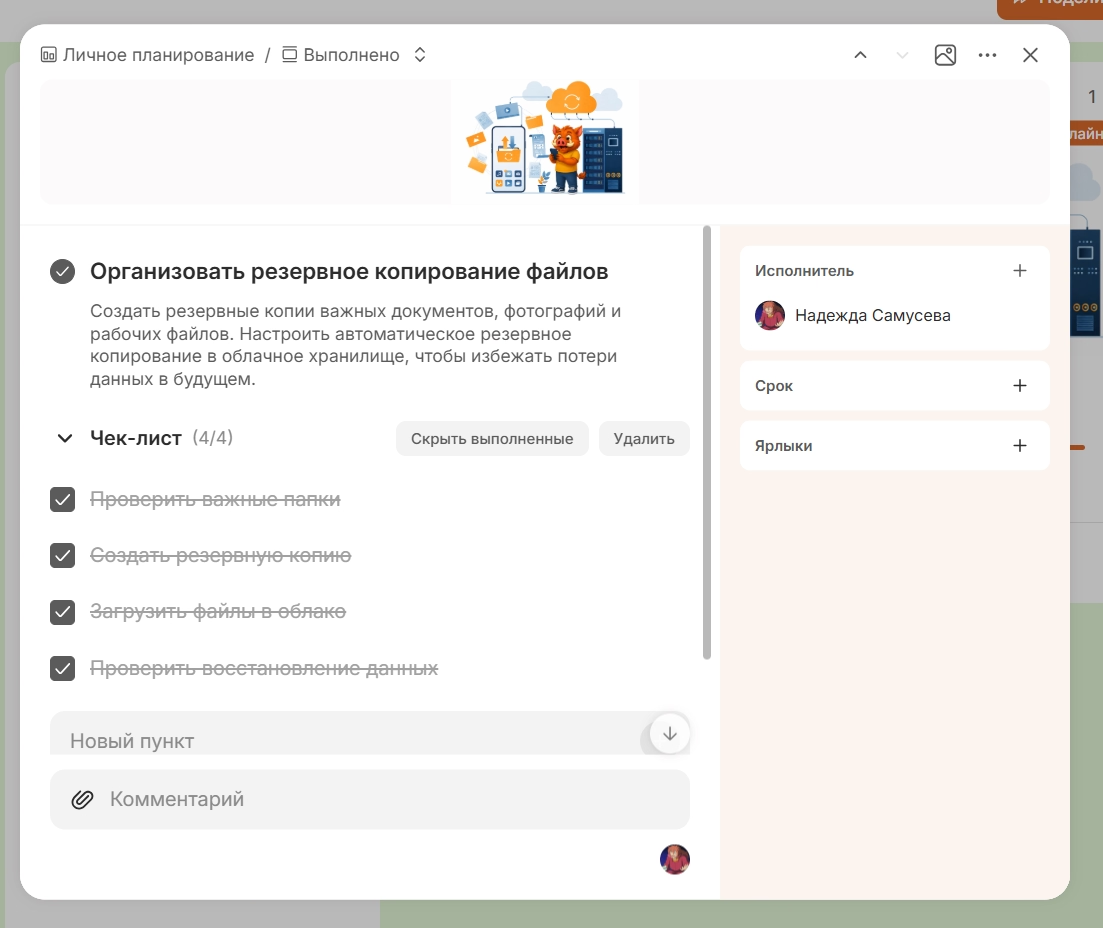
In checklists, you can also add links to other cards to link works that relate to the same process.
Find the right tasks with filters
Filters help select cards by artist, creator, status, date and labels. Several conditions can be applied simultaneously, so it is easier to quickly allocate the necessary part of the work on one large board.
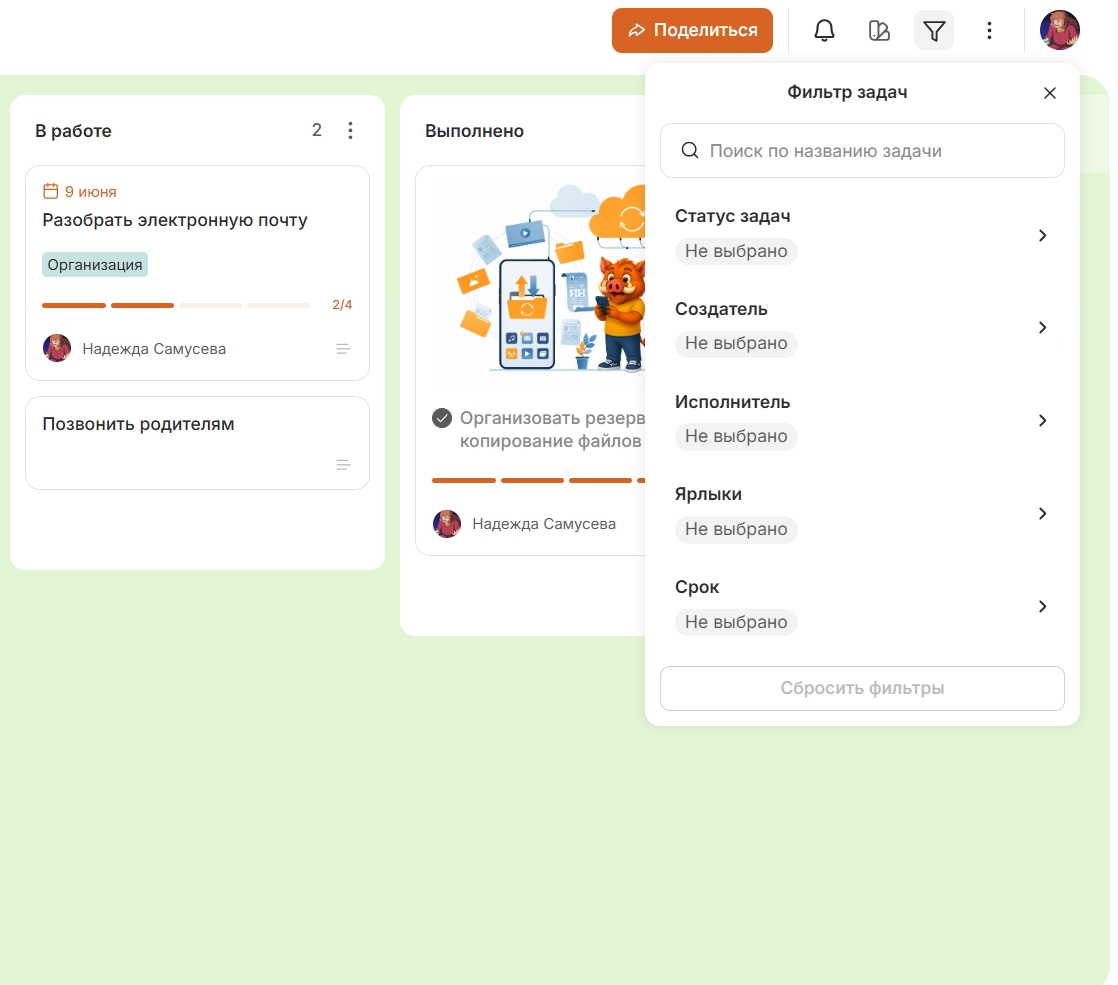
Frequently used boards can be added to a favorite, and the desired board can be found by name.
Work on the board together with other participants
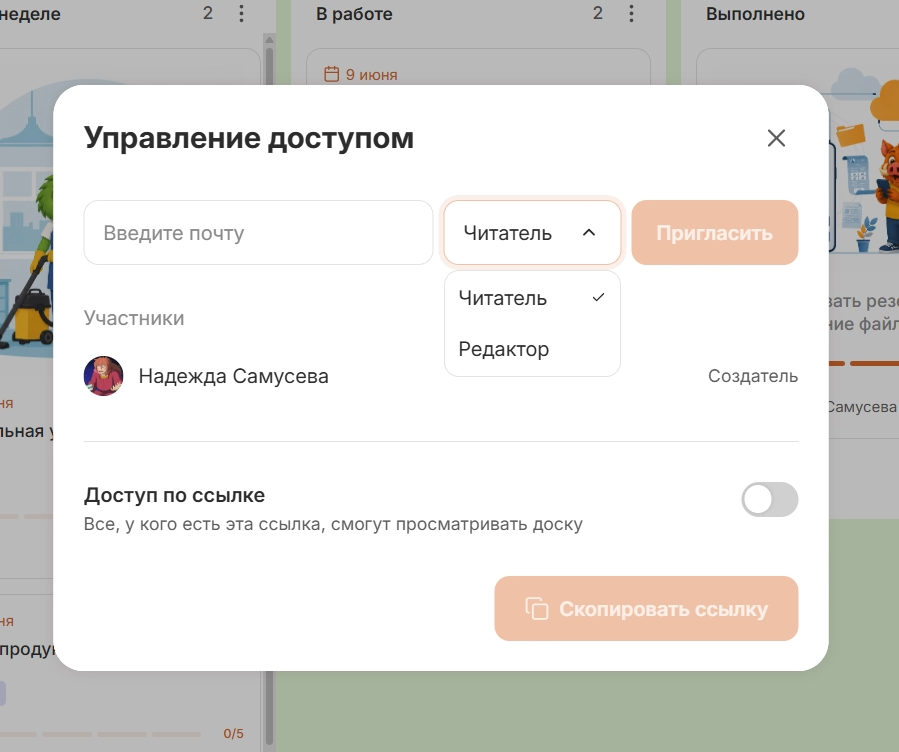
The board can be shared by email or link. There are different levels of access for participants:
- possessor manages the board and participants;
- editor Works with cards and columns;
- reader View the contents unchanged.
Changes on the common board are displayed to participants, so the current status of tasks remains available to the entire team.
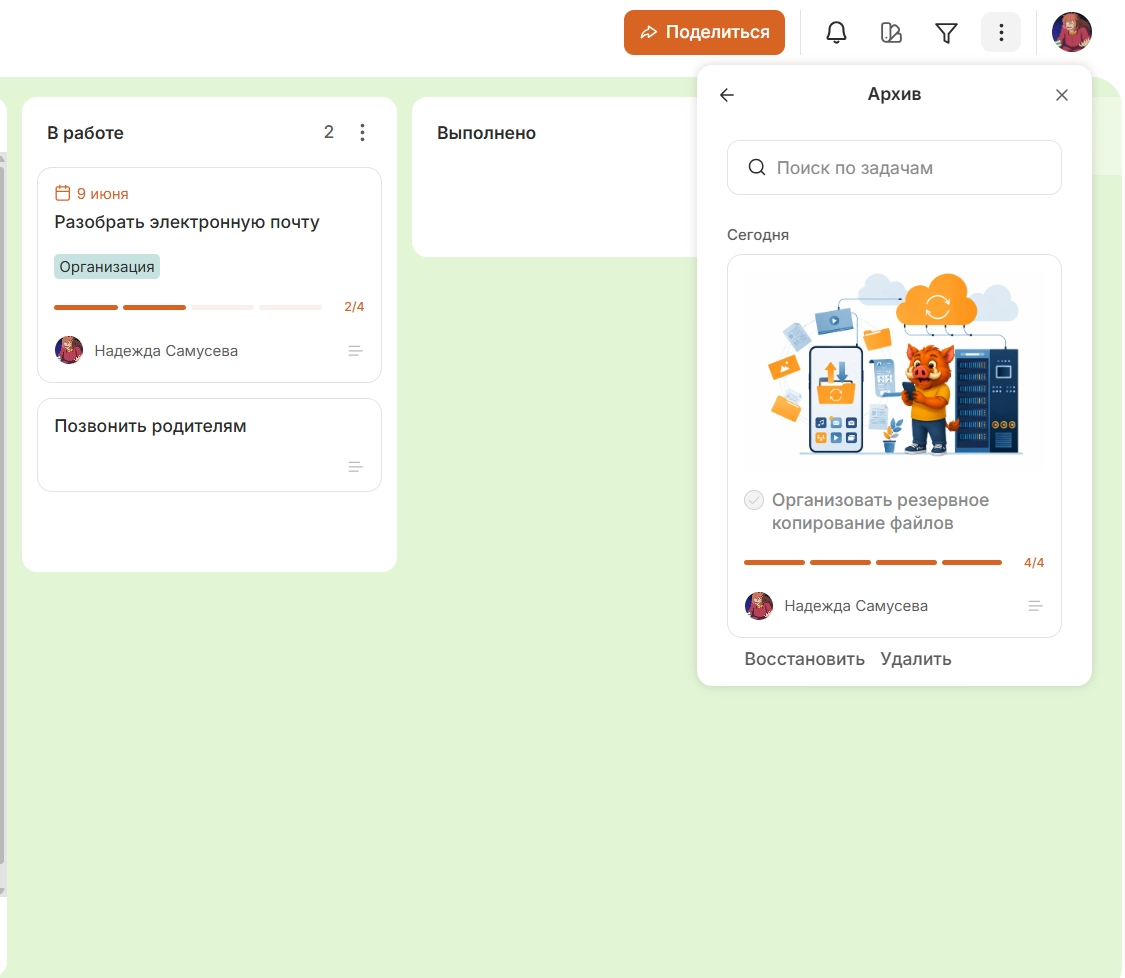
Archiving completed work
Executed and temporarily irrelevant cards can be sent to the archive so that they do not overload the current board. If necessary, the cards are restored to work.
Canbano also works in the web version and apps for Android and iOS, so the same whiteboard can be used from your computer and phone.
What to choose: Kanban board or Gantt diagram
The Kanban board should be chosen for a constant flow of tasks, and the Gantt chart for projects where timing, consistency and dependencies between jobs are important.
Kanban helps to see the current status of tasks, manage the queue, limit the amount of work started simultaneously and notice the stages at which it is delayed.
A Gantt chart is needed if the tasks are added to a common calendar plan. It shows the duration of the work, the links between them, the control points and the impact of transferring one task to the next schedule.
Both tools can be used together: the Gantt diagram for the overall plan of the project, the kanban board for daily work with tasks within its stages.