It’s easy to collect the board: three columns, cards, go. It’s hard to make a board show real work instead of turning into a dump of cards that nobody moves. The difference is in how the speakers are arranged, whether the team has agreed on the restrictions and whether the board can read.
This is a practical guide: how to decompose the process by columns, what to write on cards, how to limit the number of tasks in work and disassemble the board on the planks. The theory of the method - the principles, history, differences from scrum - is discussed separately in the article about kanbanThis is just about working with hands.
Where to start with a kanban board?
Start with a description of the real process, not with a ready-made template. The board is only as useful as its columns match the way it works now.
Assemble a team for half an hour and reconstruct the path of one typical task: where it appears, through whose hands it passes, where it waits. It is the stages of waiting - approval, verification, acceptance - that are most often forgotten, and they eat most of the time. The list of stages that will turn out is the preparation of the columns.
First board rule. Don’t design the perfect process – fix the current one, even if it’s curved. You need a board to see where the curve is. You will improve later, one change at a time.
How do you decompose the process in columns?
The process is arranged in columns so that each column reflects a separate stage of work or expectations. The minimum board is three columns, working for the team - from five.
The basic set that almost everyone starts with:
| Column | What does it mean? |
|---|---|
| Gotta do it. | Tasks are under way, but not yet started. |
| At work. | Someone is actively doing the task right now. |
| Ready. | Task completed and accepted |
The problem with this set is that the In-Work column hides the expectation. Formally, the task is a week, but in fact, five days out of seven lies waiting for someone else's answer. In order to be visible, the active stages are divided into “made” and “made, waiting for the next”:
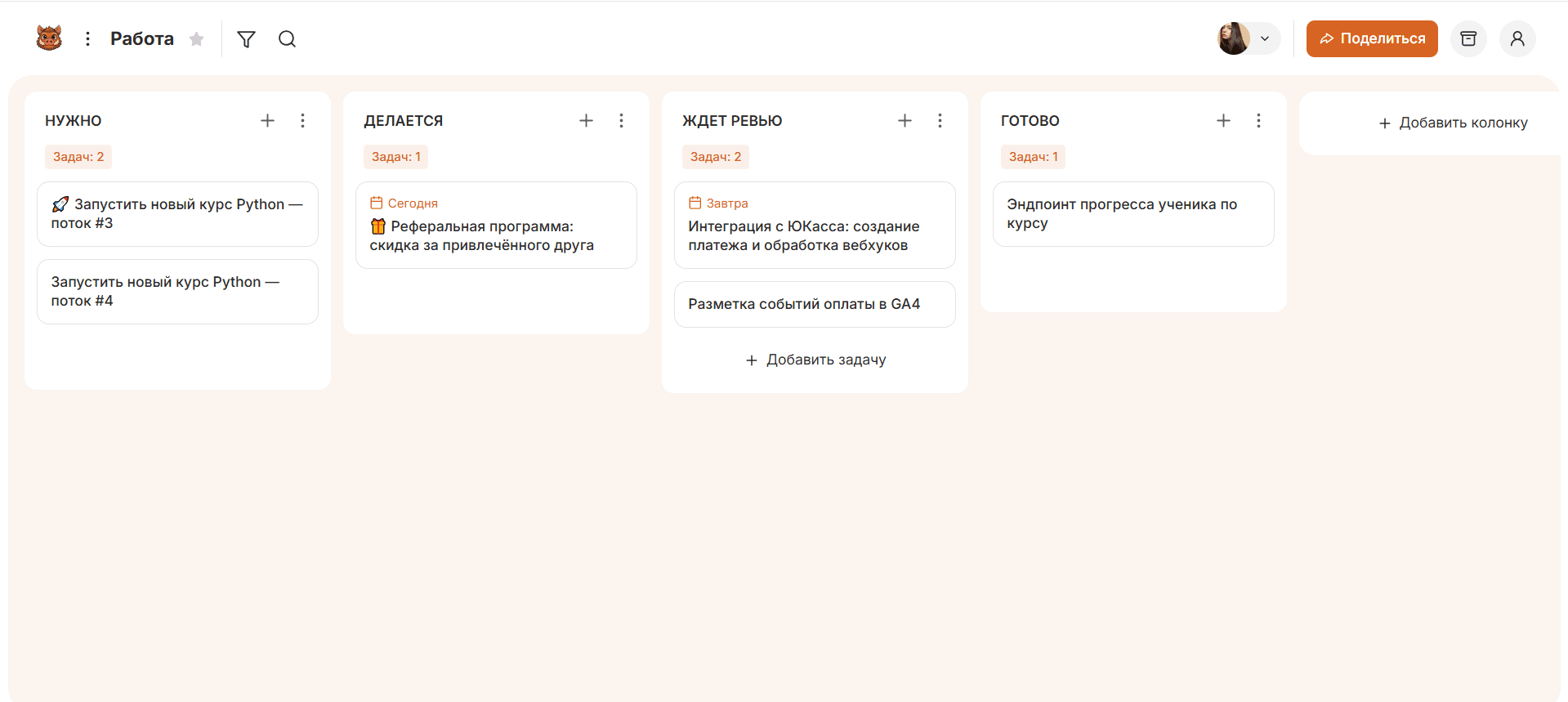
The difference between the “made” column and the next “in” column is the latent downtime. While tasks accumulate in “done, waiting for a review”, the bottleneck is visible on the board, and not revealed after the fact.
What to write on a task card?
On the card write what you need to take the task to work without additional questions. The substantive minimum is four fields: result, performer, term, priority.
The wording of the result is the most important and frequent place of failure. Landing is not a task, but a theme. “To collect the landing of shares on the ready-made layout, put on the test domain” is a task that is clear when it is closed. A good criterion: the wording shows what is considered ready.
Further add according to need, not earlier: checklist of subtasks, attachments, tag type of task (bug, feature, order), discussion. It is not necessary to overload the card with fields from the very beginning - no one fills the extra fields, and they turn into noise.
Why limit the number of tasks on the board?
The number of tasks in the work is limited so that the team brings the started to the end, and not grasping for the new. This restriction is called the WIP limit (work in progress) is the maximum of cards that the team agreed to keep in the column at the same time.
The mechanics are simple: when there are already as many cards in the “In Work” as agreed, a new task is not taken – first they close the current one or help close the colleague. The team switches from start to finish, and tasks stop hanging in bundles in the middle of the process.
The starting value is the number of performers at the stage plus one. For three people in development, 4. Then adjust: if the tasks in the column are constantly more than agreed, and the queue in front of it grows - you have found a bottleneck. Detailed effect of time limits is discussed in the material about Kanban methodology.
How to set limits in practice. Automatic locking in light boards is usually not, and this does not interfere - the limit is held by agreement, not technology. Enter the agreed number directly in the column title: In work (max. 4). Then the excess is visible to everyone on the board, and the team jerks itself. Start with a number just below the current average and lower one by one until the flow is even.
How to use tracks and tags?
Tracks and tags are needed to divide tasks of different nature on one board, without starting a second board. The tracks divide the board horizontally, the tags mark the cards with color.
- Tracks (swimlanes) horizontal bars through all columns. A typical application is a separate band for urgent tasks: they go above normal limits and do not break the overall flow. Other tracks divide work by client or by direction.
- Labels Color labels on cards: task type, department, product. Allow one look to filter the board without rebuilding it.
The rule of measure is the same as with the fields of the card: enter a track or a label when you are already confused without it, not in advance. Five colors of labels that no one remembers are worse than none.
How to read a kanban board in meetings?
The board is read from right to left - from ready to new. This order forces us to first discuss what is close to completion, rather than grasping at new tasks.
What to look for on the daily plan:
- Tasks at the finish line. What can be closed today – move first.
- Stuck cards. What hasn't moved for a few days, let's see why.
- Crowded columns. Where there are more tasks than we agreed to keep, there is a bottleneck, there we direct our forces.
- Empty columns at full queue. A sign that the tasks are not stretched further.
The layout on the board takes 10-15 minutes and replaces the status meeting: not “tell who is doing what”, but “let’s see where the tasks are”. It's about cards, not people.
Which boards to assemble for different processes?
Under different processes collect boards with a different set of columns - method one, columns their own. Prepared templates from which you can start:
Development
Backlog Analytics Development: at work Development: ready Revue Testing Release.
The division of development into “in work” and “ready” shows how many tasks await the review. Keep the limit on the number of tasks on active columns - enter it in the name.
Content and marketing
Idea At work. Editing In agreement Posted
The column “On approval” is almost always a bottleneck – the material is waiting for the customer’s response. It's worth taking out.
Support
New applications At work. Waiting for a customer's response. Solved.
A separate column "Waiting for a customer's response" does not allow applications to count into the team load while the ball is on the client's side.
Personal tasks
Today. At work (max. 2-3) Ready.
The limit of 2-3 tasks on “In Work” is the whole point of a personal board. It does not allow you to spray and forces you to bring what you started to the end.
Each of these sets is a starting point, not a dogma. Collect the one closest to your process and adjust the columns as the real steps manifest.
What mistakes kill the board?
Four mistakes kill the board: someone else’s template, no limits, thrown cards and columns without transition rules.
- Copy pattern. Columns from someone else's process don't reflect yours - the board doesn't show where the tasks stand.
- No limits board. It turns out visualization without control: tasks are visible, but there are still twenty of them in work at the same time.
- The cards don't move in time. If the status is changed once a week retroactively, the board shows yesterday and lies about the deadline.
- There are no transition criteria. While everyone has their own “ready”, tasks return with a review for unknown reasons. Decide what to consider ready for each column, and keep it visible.
How to assemble the first board in 10 minutes?
The first board is assembled in a few steps, without delaying the approval of regulations. A quick start is more important than the correct scheme - you will specify the scheme along the way.
- Write down the steps a typical task goes through, including expectations.
- Make a column for each stage.
- Transfer all current tasks, including those started and forgotten.
- Work like this for a week without changing anything - that's your source data.
- Agree on the maximum of tasks in the active columns and the transition criteria between them.
A quick start is fine. canbanoThe board is created in a few seconds, without setting up the project and inviting participants by mail. Access is provided by a link, so colleagues see the board immediately, not after the creation of accounts. The web version and applications for iOS and Android work on the same data, and through an open API to the board you can connect AI assistants and external services.
Frequent questions about working with kanban board
How many columns should there be on the board?
As many actual steps as a task, plus separate columns for expectations. At least three, the team usually has five or seven. More than nine is a sign that the process is worth simplifying.
How many tasks should I keep working at the same time?
The benchmark for the WIP limit is the number of performers at the stage plus one. Or work for a week without restriction, look at the average number of tasks in the column and agree to keep a little less. Autoblocking in light boards is usually not - enter the agreed number in the name of the column so that the excess is visible to everyone.
How does a kanban board differ from a regular task list?
The list shows what needs to be done, the board - at what stage each task and where the queue accumulates. The list answers “what”, the board answers “where stuck”.
Do you need to limit the number of tasks on a personal board?
Yeah, and that's the main thing about personal kanban. Keep 2-3 tasks on “In Work” – this does not allow you to spray and forces you to bring what you started to the end.
How to run a board if the tasks are very different sizes?
Decompose large tasks into cards of comparable scale. Otherwise, the board and the metrics lose their meaning: a two-hour card and a three-week card are incomparable.