Planning the day begins with the priority of tasks: you need to understand what things are relevant to today, what to do first and what work requires attention right now.
The working order is built sequentially: tasks are collected in one place, selected for a day, prioritized, divided into specific actions and performed in turn. The Kanban board helps to consolidate this sequence and separately show the overall list, the plan for today, current work and completed business.
How to create a task plan for the day
The task plan for the day consists of six steps:
- Get everything in one place. The general list includes work orders, calls, meetings, personal questions and other actions that require execution.
- Select tasks for today. The daily list takes into account available time, meetings and fixed-term commitments.
- Determine the order of execution. First, there are cases with the near term, serious consequences of the transfer and dependencies for another job.
- Break down major tasks into steps. The plan for the day includes specific actions with a clear result.
- Leave one main task to work. The rest of the tasks are waiting for their turn.
- Leave free time for incoming tasks. New orders should not automatically increase the daily list.
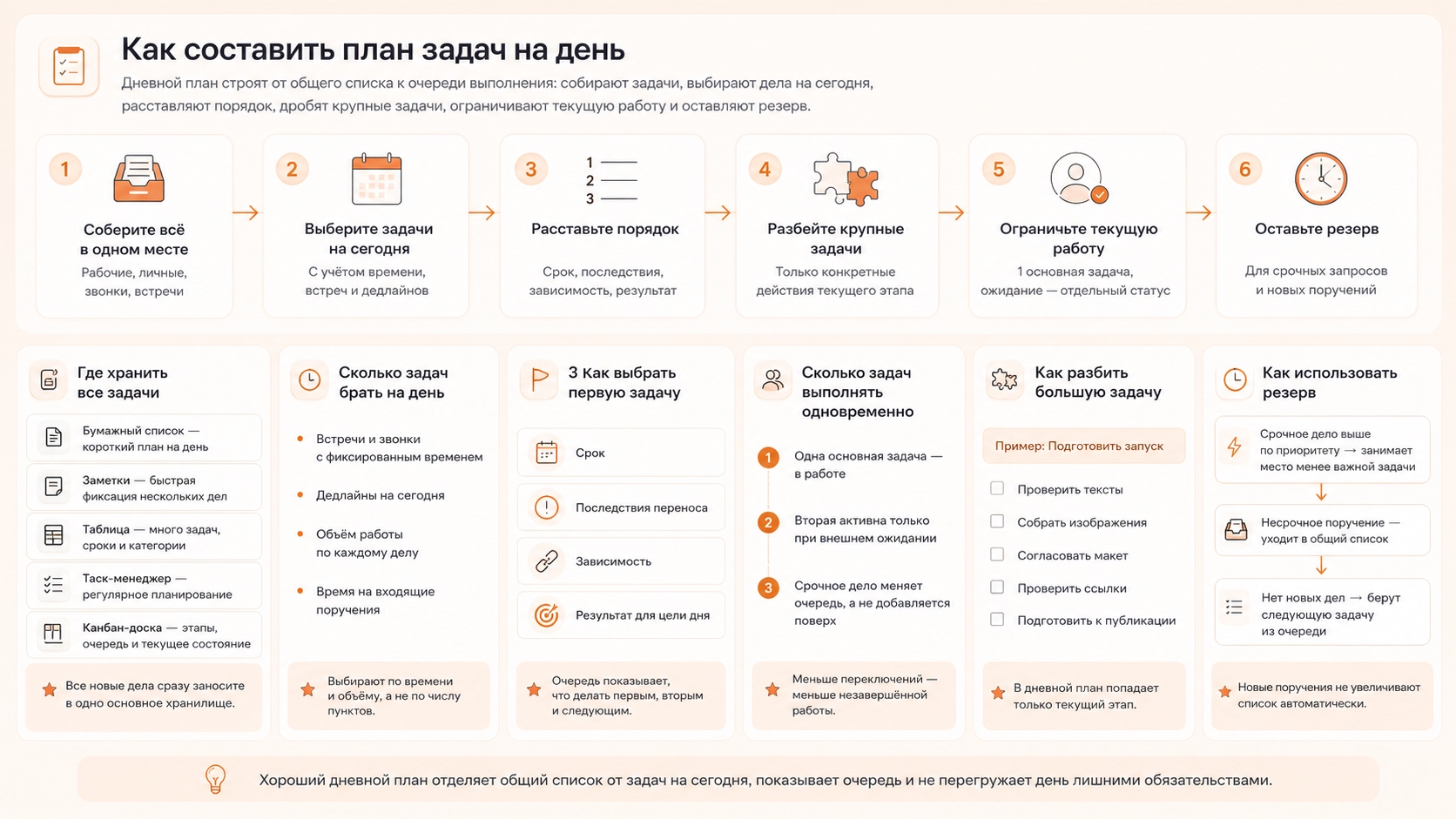
Where to store all tasks so as not to keep them in your head
All tasks should be stored in one main place: a paper list, notes, a table, a drag manager or on a kanban board. A single repository allows you to see the full scope of cases and prioritize them.
- A paper list is suitable for a short day plan. The case is recorded and deleted after execution. Frequent transfers complicate this format, since the changed order has to be rewritten.
- Notes retain a linear structure but are edited faster. A large list gradually mixes future affairs, current orders and completed items, so the order must be marked manually.
- The table adds structure at the expense of individual columns with term, category, priority and state. This format is suitable for a large registry, but requires constant updating of data.
- Tusk manager keeps each case as a separate task. It records the name, term, description, steps and related materials. The Kanban board further distributes tasks by stages and separates the overall list from the current work.
All new cases should be transferred to the selected main storage. Otherwise, some of the instructions will remain in correspondence, notes and notebooks and will not fall into the daily plan.
How many tasks to choose for the day
You should choose no more than six priorities per day. This limit is used in the Ivy Lee method: six cases are prearranged according to importance and executed in order. For tasks lasting several hours, the daily list is reduced because meetings, calls and incoming errands take up part of the working time.
Before drawing up the daily list, take into account:
- meetings and calls with a fixed time;
- tasks with the deadline for today;
- amount of work on each case;
- Incoming errand time.
The remaining working time is divided between tasks that need to be completed or brought to a specific result. Businesses without having to perform them today remain on the overall list and await the next planning.
How to determine which task to do first
The priority of the task is checked by four characteristics:
- deadline At what point the result is needed;
- transference - what happens when you delay;
- dependence What other work awaits the completion of this task?
- result What matters more to the purpose of the day?
Material that needs to be sent for approval before lunch is put above parsing the mail. Sending triggers the next step and affects the other person’s work. The mail remains in the plan, but takes a later place.
The same “important” label does not define the order between multiple cases. The queue should show which task is the first, which is the second and what work a person takes after completing the current one.
How many tasks to perform simultaneously
One main task should be performed simultaneously. A study by Rubinstein, Meyer, and Evans in the Journal of Experimental Psychology (2001) showed the time cost of switching between tasks: after a rule change, you need to re-activate the goal and work rules. The second task remains active only when external waiting for the first.
Parallel execution often turns into several unfinished actions: a report is opened, a presentation is nearby, a letter is sent in a separate window, and the answers in the chat constantly change focus. Returning to each case requires reopening the materials, finding a stopping point, and restarting the next step.
The problem with external dependence requires a separate state. The document sent for approval does not require active work until a response is received. In the task, record what result is expected, then proceed to the next point of the queue.
A new urgent order is not added on top of several started cases. A higher priority changes order: the current task returns to the queue, and the urgent one takes its place.
How to break a big task into actions for one day
A large task is broken down into specific actions with a clear result. The wording “prepare to launch” does not indicate the scope of the work, the sequence and the moment of completion.
A launch, for example, consists of several steps:
- check the texts;
- collect images;
- coordinate the layout;
- check the links;
- prepare materials for publication.
The daily plan includes only actions that relate to the current stage. All major work is not required to be kept on an active list.
Each step should have a clear completion limit. The phrase “to collect images for five screens” is more specific than “to take pictures”.
Decomposition of the task also shows the dependencies between the actions. First collect materials, then add them to the layout and then send the result for approval. Part of the priority is determined by the logic of the work itself.
How much time is left for unplanned tasks
For unplanned tasks, it is worth leaving 1-2 hours out of an eight-hour working day, that is, about 12-25% of the time. This stock allows you to accept incoming requests, calls and urgent orders without automatically transferring all planned work. With a regular volume of incoming tasks more than two hours, the reserve is increased.
The new task is assigned to the current priority:
- An urgent matter with a higher priority takes the place of a less important task in the day plan.
- non-urgent order falls into the general list;
- Free reserve without new orders takes the following task from the queue;
- The work started is used to fill the reserve, if it is necessary to bring it to a result.
So new cases do not increase the daily list automatically, but are built into a certain queue.
How to allocate tasks per day on the Kanban board
In Kanbano, tasks for a day are distributed between four columns, the user himself adjusts the number of columns and their names to his way of planning.
So the board immediately shows the overall list, the day queue, the current task and completed tasks. The position of the card reflects the priority and implementation stage.
How to set up an online kanban board to plan the day
For daily work in Kanbano, it is enough to create four columns and distribute task cards between them.
- All tasks - a general list of cases without reference to a specific day.
- Today. tasks chosen to be performed during the day.
- At work. - current task.
- Ready. - completed business.
In the morning, cards with topical tasks move from “All tasks” to “Today”. The first priority case moves to “In the Work”. The completed card is sent to “Done”, after which the next task from the day queue goes into work.
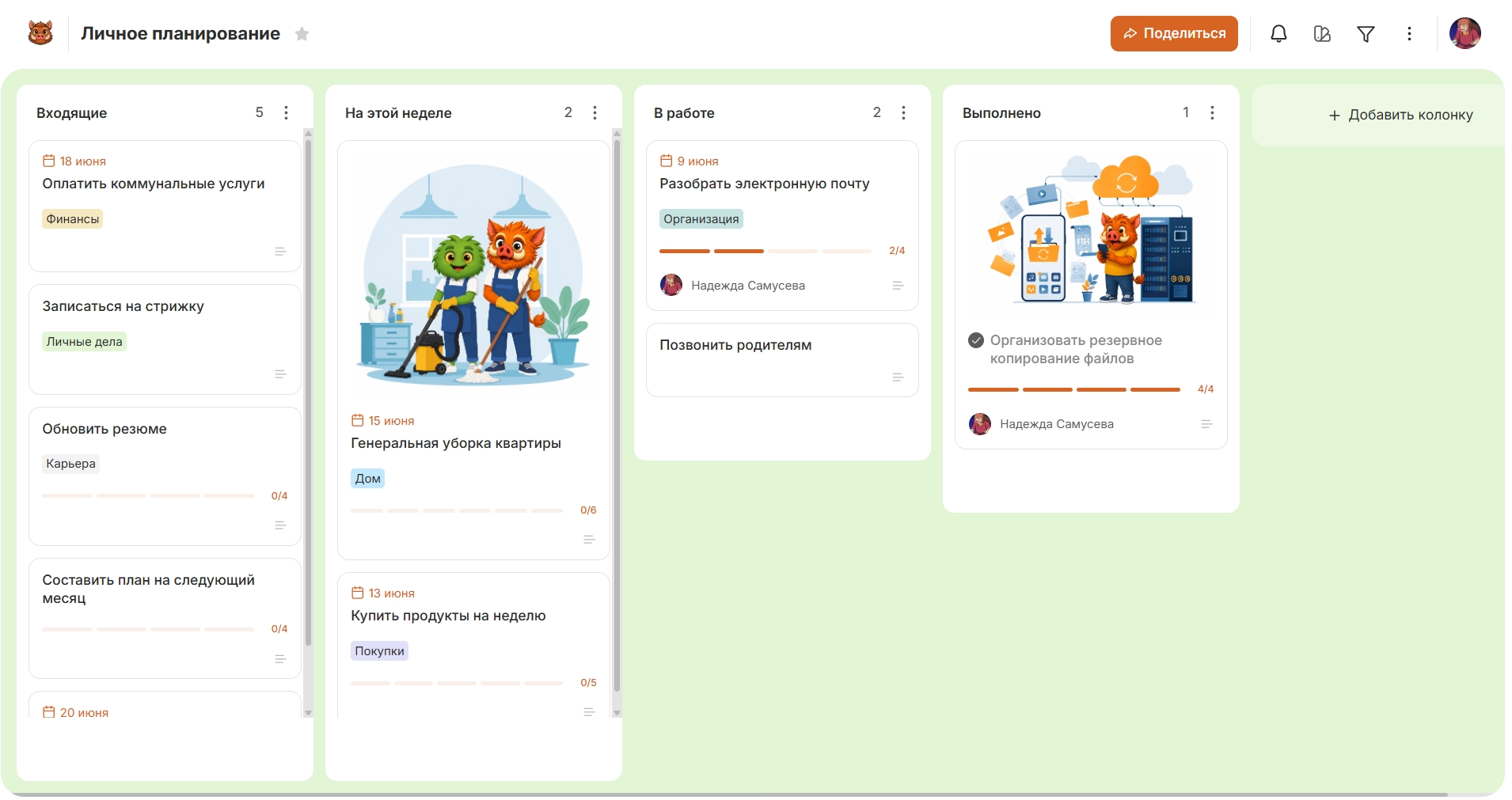
The task card itself stores the details of the task: description, date, marks, status, checklist and attachments. Because of this, the plan remains on the same board, and the context for each case does not have to be searched separately.

How to limit the number of tasks at work
In the column "In work" should keep one active card, this order shows the current business and does not turn the daily plan into a set of simultaneously started tasks.
The queue changes in three cases:
- task accomplished There is only one card left in the work.
- The problem is an external response – the card fixes the expectation, and the next case from “Today” is taken into work;
- There is a higher priority order. The current card returns to Today, and the urgent card takes its place.
After completing the urgent task, the person returns to the previous queue. This arrangement retains a limitation on current work even if the plan changes during the day.
What to do with unfinished tasks at the end of the day
Unfinished tasks at the end of the day are disassembled according to the state: the work started is evaluated separately, not started again cases are placed on priority, and items that have lost their relevance are removed from the queue. Automatically transferring the remainder creates a new overloaded list for the next day.
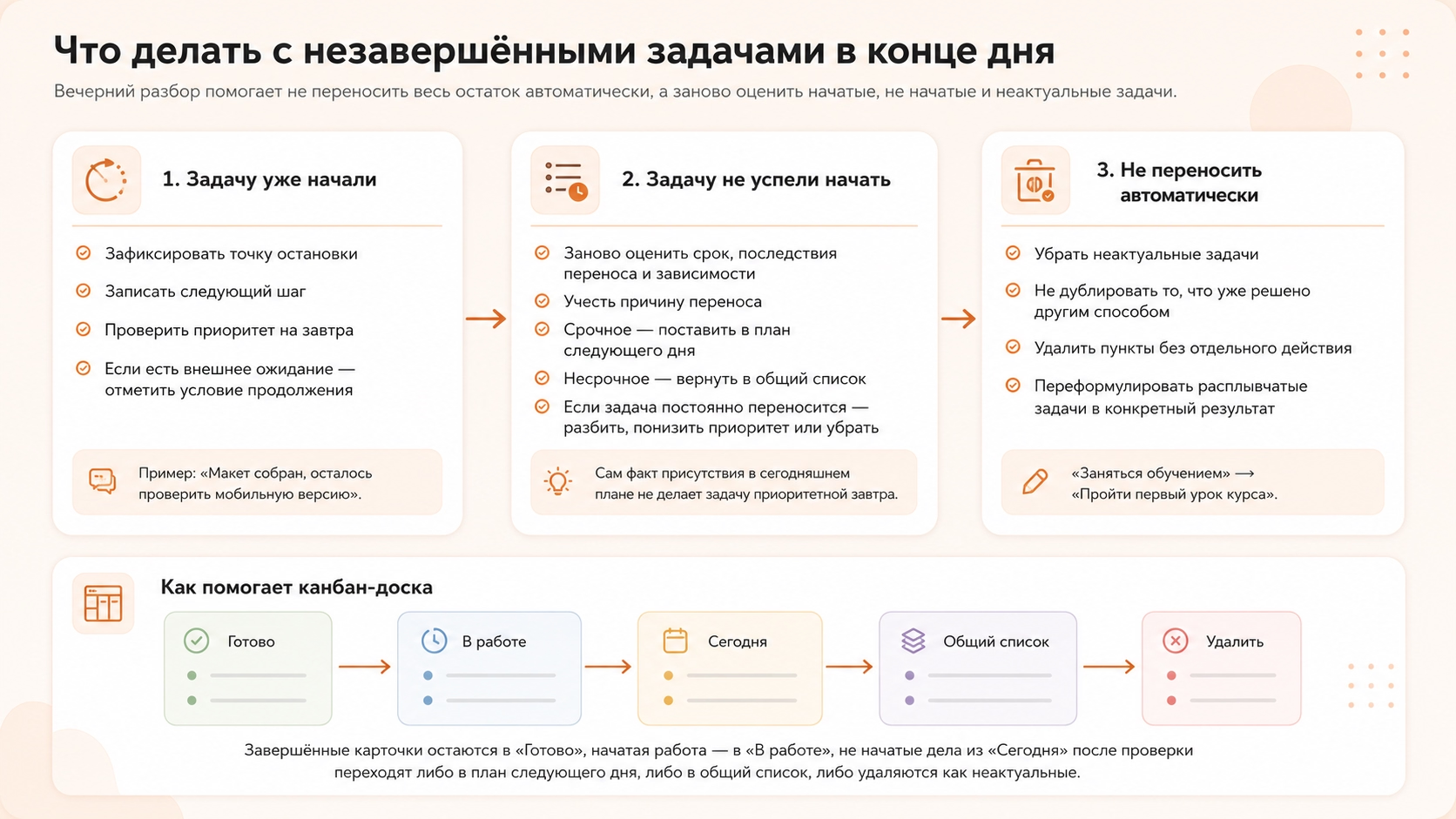
What to do with a task that has already begun
The started task should be completed, left in work or moved to the next day after checking its status and priority.
Before transfer, you should:
- stop-point For example, “the layout is assembled, it remains to check the mobile version”;
- next step the specific action from which the work will continue;
- re-priority A business started today does not automatically get first place tomorrow.
- wait out Specify what response or result is needed to continue.
So the next day, the person returns to a specific stage of work, rather than restoring the entire context of the task anew.
What to do with a task you haven’t started
An unstarted task should be re-evaluated by the timing, consequences of the transfer and dependence on other work. The mere fact of being present in today's plan doesn't make it a priority the next day.
The reason for the transfer also affects the decision. Urgent work might have displaced the task, the meeting took longer, or the initial scope was misjudged. The new plan should take into account this reason, not repeat the previous list without changes.
The task with the current deadline goes to the next day’s plan and gets a new place in the queue. The case without the need for urgent execution is returned to the general list.
Regularly moving the same item indicates a problem with the task itself. Too much work is broken down into action. A case without high priority is returned to the list. The irrelevant item is removed.
What tasks should not be transferred to the next day
The next day, cases that have lost their relevance, have already been resolved in another way or no longer require separate action are not tolerated.
From the active list remove tasks for which:
- an event or meeting has been cancelled;
- The question has already been decided by another person.
- the desired result is obtained without a separate action;
- The original solution is no longer used.
- The wording does not contain a specific result.
The latter case does not require removal, but clarification of the task. “Training” does not specify a completed action, and “passing the first lesson of the course” already describes a specific next step.
How Kanban Helps You Plan Your Day
Kanban board helps to plan the day through one repetitive cycle: to collect tasks, select tasks for today, determine the queue, take one card to work and after completion go to the next. At the end of the day, the remaining tasks are reviewed again.
The board shares the overall list, day plan, ongoing work and completed business. Priority determines not only the mark inside the task, but also its place in the queue.
In the online Kanban board, this scenario is built on a board with cards and columns: a person sees what needs to be done today, what he is doing now and what task to take next.